

In your company, Excel macros keep spreadsheets tidy, file imports move data into the ERP, and rules in the system calculate prices. So what does the AI automation that vendors talk about actually change? Do you need to add it to something that already works? Not necessarily. If your data follows a fixed layout and you can describe exactly what needs to happen, rules are still enough. AI can help where your team needs to read an email, understand an item description or find information in a document with a different layout.
You are not choosing between AI and rules for your whole company, but for individual steps in a process. Within a single order, AI can read the content while rules check prices and quantities. What matters is not just what an AI model can read, but also how to check its output before it reaches the ERP.
What is AI automation, and how does it differ from rule-based automation?
Rule-based automation follows steps defined in advance by a person, while AI automation uses a model to interpret content and produce a result based on it. The difference is whether the software follows a fixed instruction or draws inferences from the data it receives.
If your company uses Excel macros, file imports into the ERP, integrations that move data between programs or rules that automatically calculate prices by customer group, you already have automation. The same data will always produce the same result. The software does not need to understand the content: it just needs to follow the instruction.
The same applies to RPA (robotic process automation), which is software that carries out actions in other applications much as a person would: clicking, copying and retyping data. Imitating an employee’s work does not by itself mean that AI is involved. Microsoft describes RPA in Power Automate as a tool for repetitive, rule-based tasks, including entering data into an ERP.
In AI automation, also called intelligent automation in vendors’ offers, at least one step works differently. An AI model, that is, software that understands and produces text, reads an email or PDF, for example, and identifies the information it contains. It does not look for that information in a fixed column, so it can also recognise it in free-form text or a document with a different layout. The remaining steps can still follow fixed rules.
The EU AI Act draws a similar distinction: what matters is the ability to infer, meaning to work out from data how to generate a result. Simply following rules written by a person does not make software an AI system.
| What are you comparing? | Rule-based automation | AI automation |
|---|---|---|
| Input data | Data in a fixed, known layout. | Free-form content and documents with different layouts. |
| Result for the same data | Always the same. | May differ on the next run. |
| How errors occur | Stops or reports an error when it encounters an unfamiliar layout. | May return a plausible-looking but incorrect result. |
| Cost per use | Virtually zero. | A charge for tokens, the fragments of text that a model reads and writes. |
| New document layout | Someone has to add or change a rule. | Usually requires no changes, but the results need checking. |
Here is the catch: greater flexibility does not mean you can be certain of the result. AI will read a document that your macro cannot handle, but it can also make a mistake without a clear error message. So this is not a new name for the same automation. It is a different way of working, with a different kind of risk.
When is rule-based automation enough?
Rules are enough when data arrives in a fixed format and the decision can be defined unambiguously. If a program needs to read a specified field and follow a set instruction, AI adds nothing but cost and the risk of error.
The input could be a CSV file sent by your customer’s system or an EDI file, a document in a standard for electronic data exchange between companies’ systems. The same applies to an invoice from KSeF, Poland’s National e-Invoicing System: from 1 February 2026, it takes the form of an XML file in the FA(3) layout. The program reads its fields directly. It does not need to interpret the content to find the value it needs.
The same goes for decisions. Does the price come from the price list and the price reduction from the customer group? A rule is enough. Checking stock levels, changing a document’s status or putting an order on hold when a credit limit is exceeded do not require interpretation either. The result is repeatable, it is easy to trace why it occurred, and applying a rule involves no fee for using an AI model.
Before commissioning a tailor-made solution, it is worth checking what the vendor of your ERP already offers. Many of these features may already be available in the program itself or an add-on, including AI-based features. For example, Comarch provides AI agents in Comarch ERP Optima and Comarch ERP XL that categorise and code documents to ledger accounts, classify costs, verify e-invoices and reconcile payments. Usage is billed in tokens, the fragments of text processed by the model. That is good news: not everything needs to be built from scratch.
And what if your older program has neither file import nor an API, an interface for exchanging data with other programs? RPA may then make sense: a software robot clicks and enters data on screen as an employee would. According to Microsoft, it can also use interface elements in older applications, images or screen coordinates. Hence its weakness: a change to the program’s appearance after an update can disrupt the robot’s work. RPA is therefore not outdated. It is useful where there is no other way to enter data.
When do you need AI, and what do you have to check afterwards?
You need AI when you have to understand free-form content or read documents with varying layouts. Rules can then check the result, rather than describe every possible way the information might be written.

This applies to orders written in the body of an email, PDFs from different suppliers or requests for quotation expressed in words. AI can also help match an item description to its name in your ERP. According to Eurostat data, analysis of written language (text mining) was the most widely used AI technology among EU businesses in 2025. It was used by 11.75% of companies.
What about an Excel file from a customer? A change in column order alone does not mean you need AI. The sign to look for is a growing number of fixes: the macro works, the customer changes the layout, someone adds an exception. As the number of customers and file versions grows, your team keeps fixing the file import. At that point, using AI to read the data and rules to check the result may cost less than maintaining an ever-growing set of exceptions.
This does not mean, however, that the extracted data can go straight into the ERP. The AI step has three limitations:
- The model may provide information that is false or does not match the document. As Anthropic’s documentation on hallucinations explains, safeguards reduce these errors but do not eliminate them entirely.
- The same document can produce different results. Comparing several responses to the same instruction helps detect inconsistencies, but it does not replace checking critical data.
- A correct format does not mean correct data. You can enforce fields and their types, for example through Structured Outputs, a feature of the OpenAI API. The item code, quantity and price will then be in the right places, but their values may still be wrong. The model may also refuse to answer, or its response may be cut off, so the program must be able to recognise this.
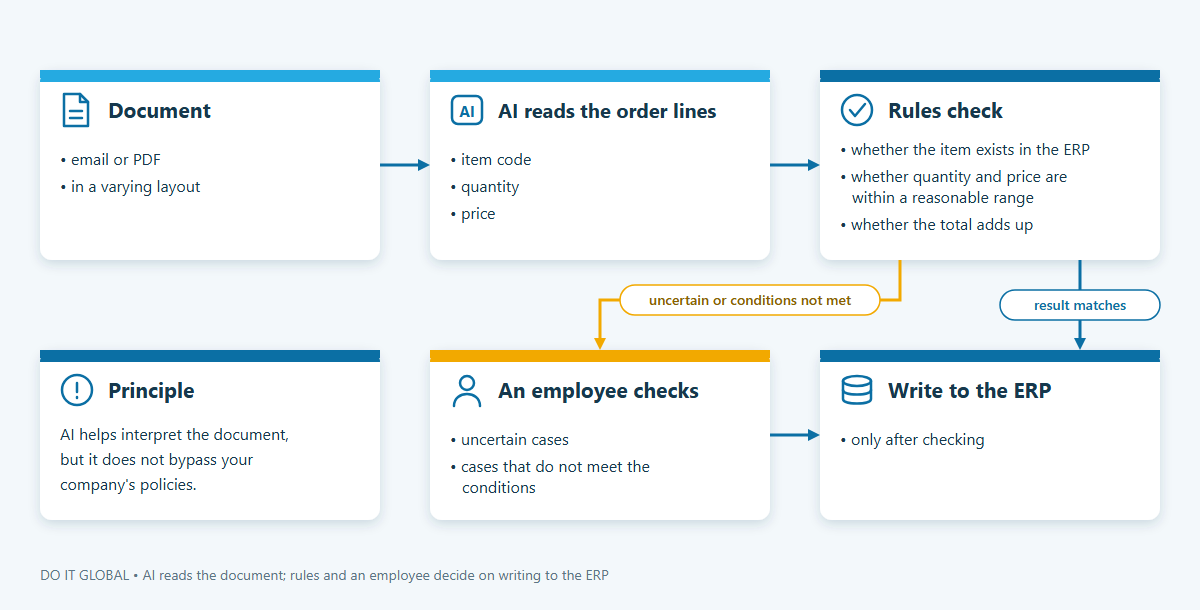
That is why, when we automate processes with AI, we design the AI step together with a check on what it has read. Rules check whether the item exists in the ERP, whether the quantity and price fall within a reasonable range, and whether the total adds up. Uncertain cases go to an employee. Data is written to the ERP only after it has been checked. AI helps interpret the document, but it does not bypass your company’s policies.
How do AI and rules share the work in orders, quotations and invoices?
Within a single process, rules handle some steps, while AI handles only those that require an understanding of the content. Well-designed AI automation does not send every document to the model.
Example: a wholesaler with three kinds of orders
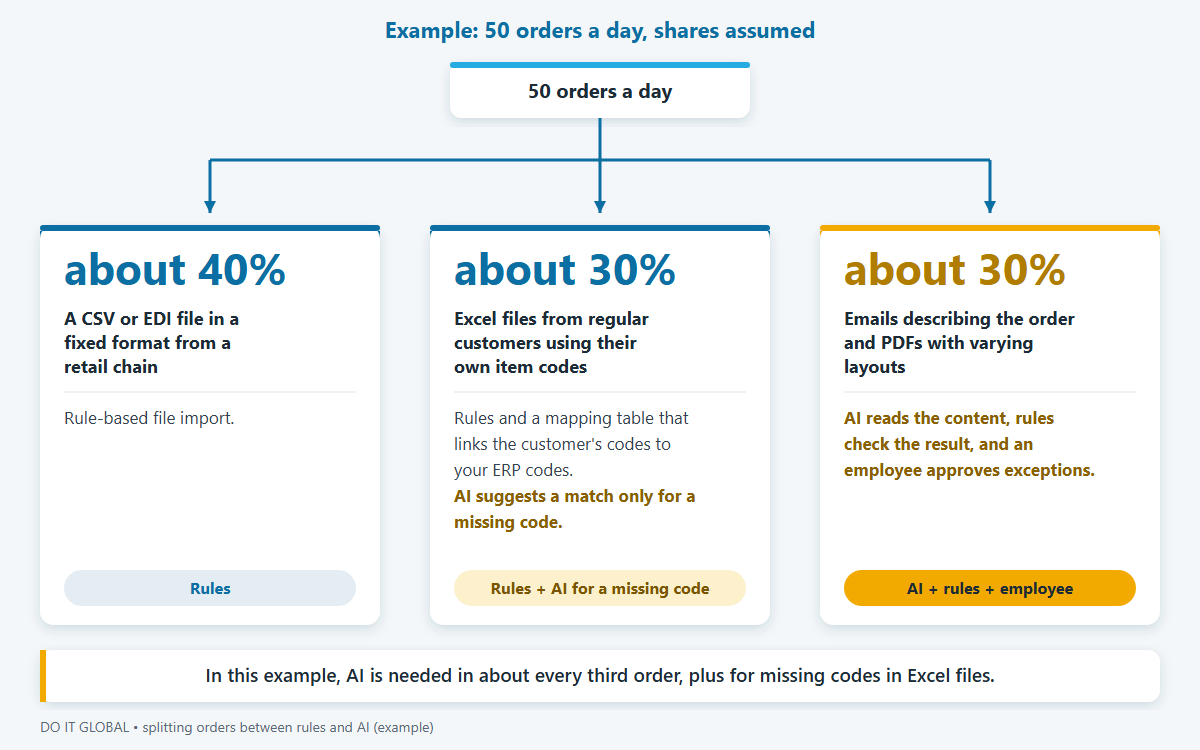
Suppose a wholesaler receives 50 orders a day. Some arrive in a fixed format; others require reading a description or identifying an item. The work could be split like this:
| Order type | Share (assumption) | What is enough |
|---|---|---|
| A CSV or EDI file in a fixed format from a retail chain | about 40% | Rule-based file import. |
| Excel files from regular customers using their own item codes | about 30% | Rules and a mapping table that links the customer’s codes to your ERP codes. AI suggests a match only for a missing code. |
| Emails describing the order and PDFs with varying layouts | about 30% | AI reads the content, rules check the result, and an employee approves exceptions. |
What does this mean for your team? A known code from an Excel file goes into the ERP using the mapping table. There is no need to ask the model which product it is every time. Only a new code needs an AI suggestion and a check by an employee before it is added to the table.
For emails and PDFs with varying layouts, AI reads the order lines. Rules then check the result, and cases that are uncertain or do not meet the conditions go to an employee.
In this example, AI is needed in about every third order, plus for missing codes in Excel files. This share determines the running cost, the number of results to check and the scope of implementation. Model charges apply only to the steps where AI actually does the work, not to all orders. We describe the whole process and give an example cost calculation in our article on moving orders from email into your ERP without retyping them.
Quotations and cost estimates
The split is similar for quotations. The customer describes what they need in words, and AI reads the enquiry and matches the items described to products or elements of the cost calculation.
That is where its role ends. Rules and the ERP handle prices, price reductions, stock levels and costs, not the model. A salesperson or technologist checks the draft before it is sent: does it meet the customer’s needs, and have the items been matched correctly? This is the division of work we use when preparing quotations and cost estimates from ERP data.
KSeF purchase invoices
The starting point is different here. A KSeF invoice is an XML file in the FA(3) layout. Rules read the data and compare it with the order and the goods dispatch note (WZ), the document that records goods leaving the warehouse.
A fixed structure does not mean that matching is easy, though. The field for the order number and date is optional, so the seller may leave it out. The optional “Index” field on an invoice line contains the seller’s internal code, not the code in your ERP.
That is why a code mapping table is sometimes needed, along with an AI suggestion for an employee to check when items are new or described differently. Rules flag differences in quantities and prices, and an employee makes the decision. This is how we design the process for checking KSeF purchase invoices against orders and goods dispatch notes.
How do you check whether your process needs AI?
Go through your process step by step and ask the questions below at each stage. The answers will show where rules are enough and where AI is needed.

- Does the data always arrive in the same format? If a file from a system, an XML file or an EDI file has a fixed structure, rules are enough to read the data. Simply moving information does not require AI.
- Can you describe the decision clearly enough for a new employee to make it without asking further questions? If so, you can write it as a rule. You do not need a model for that.
- How many versions of documents reach this step, and how often do new ones appear? The greater the variety, the more it costs to maintain separate rules. That is a sign that it is worth considering AI to interpret the content.
- Can a rule check the result? Comparing it with a price list, stock levels or the list of items in your ERP helps safeguard the AI step. It is worth defining exactly what will be checked.
- How much does a mistake cost, and who will spot it? The answer determines how many results an employee needs to approve. Getting an answer from AI does not in itself mean you can pass it on without checking it.
- Does the vendor of your ERP already offer this feature? It is worth checking what it can do first, then assessing whether you need a tailor-made solution.
During this review, it is worth watching out for four common pitfalls:
- AI calculates a price reduction even though the ERP already does this itself, in the same way every time.
- Importing emails or documents in different layouts piles up dozens of exceptions, even though it would be simpler to add an AI step and rules to check its result.
- The AI result goes into the ERP without being checked against rules.
- An RPA robot is treated as AI even though it only clicks according to instructions and does not interpret content.
A lack of knowledge is the most commonly cited reason for deciding against AI: according to Eurostat, 70.89% of EU companies that considered AI but did not use it gave this reason in 2025. If you find it difficult to work out which steps need rules and which need AI, process analysis can help.
Frequently asked questions
Is RPA artificial intelligence?
RPA (robotic process automation) is not artificial intelligence. If you are wondering what RPA is, it is a software robot that performs an employee’s tasks in other programs, following set rules without interpreting anything. Under the AI Act, programs that operate solely according to rules set by people are not AI systems. You can, however, combine RPA with AI: the model reads a document, and the robot enters the data into a program without an API, an interface for exchanging data with other programs.
Are n8n, Make and Power Automate AI automation tools?
n8n, Make and Power Automate are tools for building rule-based workflows that can include a step using an AI model. A workflow is simply a sequence of steps. These tools work well for connecting popular cloud applications. If your ERP runs on a server in your company, however, the connection to it needs to be designed. The outcome depends on how the process and integration are designed, including checking AI responses against rules and handling exceptions, rather than on the tool itself.
How much does AI automation cost compared with rule-based automation?
The main difference is in running costs: rules have no usage fees, while AI model usage is charged by tokens, the fragments of text a model reads and writes. This is how AI agents in Comarch ERP Optima are billed, for example, with the cheapest subscription costing PLN 22 excluding VAT a month (prices from 1 October 2026). Fewer AI steps mean lower running costs and fewer results to check. As a guide, implementing order or quotation automation with us costs £2,900–4,360 excluding VAT without direct ERP integration and £4,360–7,260 excluding VAT with integration. We price other solutions individually.
Does AI automation send your company’s data to an external service?
With a cloud-based AI model, parts of your documents go to the model provider, but not all automation requires data to be sent outside your company. The processing terms depend on the plan and agreement, so it is worth checking them before implementation. Rules alone can run locally. If data cannot leave your company, private AI on a server in your company may be an option, with the trade-offs of hardware costs and often lower-quality results. If an external company is involved in processing personal data, a data processing agreement is required.
Does AI automation fall under the AI Act?
Automation that uses an AI model means using an AI system as defined in the AI Act; rules alone are not such a system. The scope of your obligations depends on the use and your company’s role. The presence of a model alone therefore does not determine which requirements apply to a particular automation. It is worth confirming the legal details of your use with a lawyer.
What can you do next?
Do you already have a specific process in mind? We describe how we approach AI automation for companies on a separate page.
If you would like to apply this to your company, we offer a free call online, lasting 30–45 minutes. Together we will work out which process steps rules can handle and which need AI. It would be useful to bring a few sample documents without personal data and the number of cases per month.