
When is it worth improving order processing?
Automatically preparing data can make it easier to handle orders from customers who use different message and attachment formats. Your team receives a draft to check and can focus on stock availability, delivery dates and customer requirements. Improvements could include:
- bringing order lines from emails, PDFs and spreadsheets into one draft,
- matching customers’ product names and numbers to ERP records,
- checking quantities, units and addresses before approval,
- highlighting information that needs completing before fulfilment.
Much depends on the number of orders, how repetitive they are and the time needed to check the data. At a smaller scale, an existing feature or a simpler import may be enough.
Order automation options and prices
We can prepare data for further processing or connect the solution to your ERP. These are two different implementation scopes:
| Option | What you receive | Price excluding VAT |
|---|---|---|
| Data file | Data to check and enter or import into ERP | £2,900–£4,360 |
| ERP draft | Data matching and a draft order in the system | £4,360–£7,260 |
Preparing data in a file can be the first step towards improving order processing. This option covers reading and organising information; a member of staff enters it into the ERP or uses an available import.
How email-to-ERP order automation works
With ERP integration, a member of staff receives a draft directly in the system:
- The order arrives as usual. The solution retrieves the message and attachments from an agreed mailbox.
- Data is read and checked. The system matches the customer and products to ERP records and flags missing information or differences.
- A member of staff receives a draft. They can see the prepared order lines, the original order and information needing clarification.
- A member of staff approves the order. Before approval, they can correct the data or refer the order for manual processing.
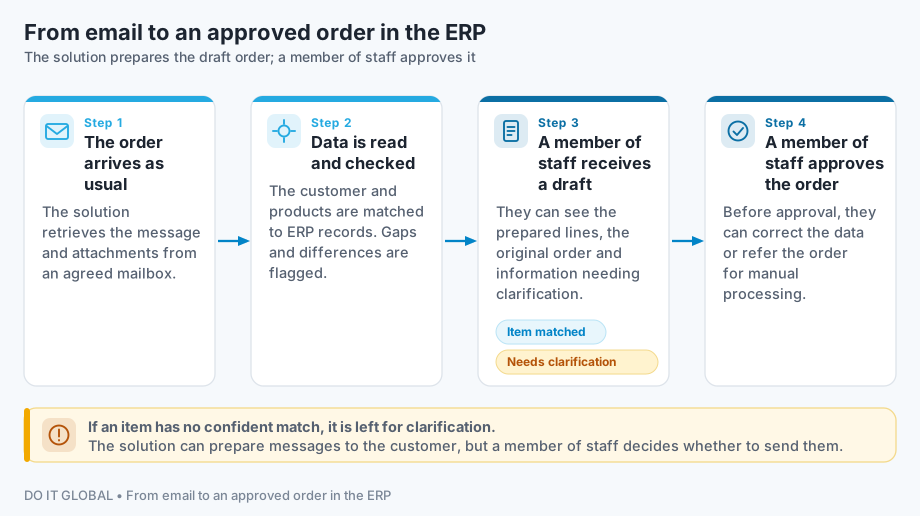
We can also add a draft confirmation or a request for missing information. A member of staff decides whether to send the message.
Example: from email to a draft order — fictional data
Customer message: “Order 74/2026: please supply 10 packs of size M nitrile gloves, 200 120-litre bags and 5 rolls of grey tape. Delivery to the warehouse in Police, Poland.”
In this example, the sender is linked to a customer record. The gloves have an approved match to an ERP product and a conversion rule: 1 pack = 100 pieces. The customer has one saved delivery address in Police.
| Data from the email | Prepared result | Status and information to clarify |
|---|---|---|
| 10 packs of size M nitrile gloves | RK-NIT-M, 1,000 pieces using the saved conversion rule | Product matched |
| 200 120-litre bags | Quantity read: 200 pieces; product to be selected | Both WR-120-CZ (black) and WR-120-N (blue) match |
| 5 rolls of grey tape | Quantity read: 5 rolls; product to be selected | Tape type, width and roll length are missing |
| Delivery: warehouse in Police | Customer’s saved delivery address in Police | Address matched |
A member of staff clarifies the bag colour and tape specifications with the customer, then completes the draft. Prices are taken from the agreed customer price list in the ERP; availability and the delivery date need checking before the order is confirmed. Where a match is uncertain, the solution leaves the item for clarification. This example illustrates how the solution works; it is not a client implementation.
What can the solution check?
We select the scope using sample orders and the data available in your system.
| Element | Example action |
|---|---|
| Customer | Matching the sender and document details to a customer record |
| Products | Linking the customer’s names and codes to ERP product codes |
| Quantities and units | Converting packs to pieces using agreed conversion rules |
| Prices and availability | Comparing against the price list and stock levels and flagging differences |
| Delivery | Reading the address, requested date and order notes |
Approved product matches can be saved for future orders. When data is missing or several products match, the solution leaves the choice to a person.
How much time could your team regain?
Illustrative calculation, not a client result
With 50 orders a day, 21 working days and 5 minutes per order, processing takes 87.5 hours a month.
Suppose 50–80% of orders need one minute of checking after automatic preparation, while the rest still take 5 minutes. In this scenario, the team regains 35–56 hours a month.
The actual effect depends on the documents and the number of corrections. Time regained does not automatically mean money saved. We also include implementation, tools and maintenance costs when assessing whether the solution is worthwhile.
Can the solution connect to your ERP?
We check the specific system and version, such as Subiekt, WAPRO, Symfonia, enova365, a Comarch product or a custom application.
Before quoting, we establish how to read the necessary data and where to prepare a draft. Documents are created through an interface or import supported by the vendor. We test the ERP connection using sample orders before launch. See how we connect to the ERP you already use.
Email automation can run alongside a B2B portal or EDI data exchange. It supports customers who still order by email. If orders come from an online shop, we first check the available integrations.
How do we start, and what does implementation cost?
During a free consultation, we discuss your expected result, order volumes, the ERP you use and how your team works. We then review sample documents and the options for connecting to the system.
If the scope is clear, we prepare a proposal. Where more unknowns need investigating, we propose process analysis. We introduce the solution in stages, starting with selected formats or customers. We check data accuracy, processing time and the number of corrections, then prepare your team to use it.
Licences, AI model usage and infrastructure are priced separately. Maintenance and development are optional.
See how we work and other examples of improvements: purchase invoice checks and job costing and quotations using ERP data.
Content updated: