
When can an AI assistant using company data help?
The assistant brings together information for a specific task: replying to a customer, checking an order or reviewing sales. Sources can include company documents and your ERP system, where your business manages areas such as sales, stock and orders. An employee could ask:
- Before a sales conversation: “What did this customer order last quarter, and do they have any overdue payments?”
- When handling an order: “What stage has the order reached, and which items are still missing?”
- When reviewing sales: “How have sales of this product group changed compared with the previous month?”
- When working with documents: “What delivery terms did we agree in the contract with this customer?”
We select specific questions, information sources and users for whom the solution will be useful. This scope also defines what the assistant can do.
ChatGPT, Claude or Copilot with company data: when do you need an integration?
ChatGPT, Claude and Microsoft 365 Copilot can use connections to selected services, such as email or a document repository. Availability depends on the product, plan and business account settings. If an existing connection provides the information you need with the right permissions, we help configure it and test it using your team’s questions.
An additional integration helps when:
- You need current figures and calculations from the ERP. For example, availability after reservations or outstanding receivables on a specific date. We check whether an existing connection retrieves this data and performs the required calculations; if it does not, we add the appropriate function.
- An existing connection does not support the source. For example, an ERP on a server at your company or a custom application.
- An existing connection does not reproduce the required permissions. For example, a salesperson should see only their own customers, while a manager can see the whole department. Access rules must be enforced when retrieving data.
- The assistant needs to take actions as well as read data. For example, preparing an order draft. This is a separate scope with approval rules.
If your team wants to learn how to use AI tools and agree usage guidelines, start with AI training for your team or a business process workshop.
The name Copilot covers several products. Microsoft 365 Copilot can use Microsoft 365 data and external sources through connectors. Copilot Studio lets you build an agent that uses data and functions from other systems. We choose the connection method for the specific product, licence and task.
A custom connection requires user access configuration and business account settings. ChatGPT supports custom MCP servers, subject to account permissions. With Claude’s remote connectors, the connection comes from Anthropic’s cloud, so the server must be reachable from that service. For an ERP on your company network, we design a secure connection to the integration; the ERP database stays behind it.
If AI needs to work within a form or window in your current application, adding AI features to your existing software may be a better fit.
Answers from ERP and documents, with sources
The assistant can use both system data and document content. We choose how to find the answer according to the question:
- Amounts, reports and statuses come from the ERP or database. The system prepares the result according to your company’s rules, and the assistant presents it clearly. For sales, for example, we define the period, the value excluding VAT and how adjustments are included.
- Contract terms and instructions are found in documents. The assistant cites passages and the documents it used. We select current material available to the particular user for searching.
Sources make it possible to check the answer. When information is missing or contradictory, the assistant should flag the problem rather than fill the gap with a guess. We test accuracy using your team’s questions.
Example assistant response — fictional data
Salesperson’s question: “What stage has order ZAM/104 reached?”
This example covers one order line. The ERP contains one linked, approved goods issue document: WZ/82.
Of the 120 units ordered, 80 have been issued from the warehouse according to WZ/82. No goods issue has been recorded for the remaining 40. The available data contains no confirmation of dispatch or a fulfilment date for the remaining part of the order.
Sources: order ZAM/104 and goods issue document WZ/82 in the ERP. Data retrieved at 10:15.
The salesperson receives information for the next customer conversation. They can open the cited documents and check the answer. They see only orders covered by their access permissions. The numbers and quantities above illustrate how the solution works; they do not describe a client implementation.
How do we connect an AI assistant to ERP and documents?
First, we check the chosen assistant’s existing connections. If they do not cover the data you need, we build an integration with your ERP, database or company application.
One method is MCP (Model Context Protocol), an open standard for connecting AI applications to data and tools. An MCP server gives the assistant only selected functions, such as checking an order or a customer’s outstanding receivables. Before using the data, the employee signs in to the integration; their account is linked to an agreed role and access scope. The query then proceeds as follows:
- The employee asks the assistant a question. The assistant calls the appropriate integration function.
- The integration checks permissions on every call. It exposes only permitted functions and retrieves data through an API or restricted database reads. Access follows the authenticated account and the integration rules.
- The assistant presents the result with its source and retrieval time. It cites documents or identifiers the employee can check.
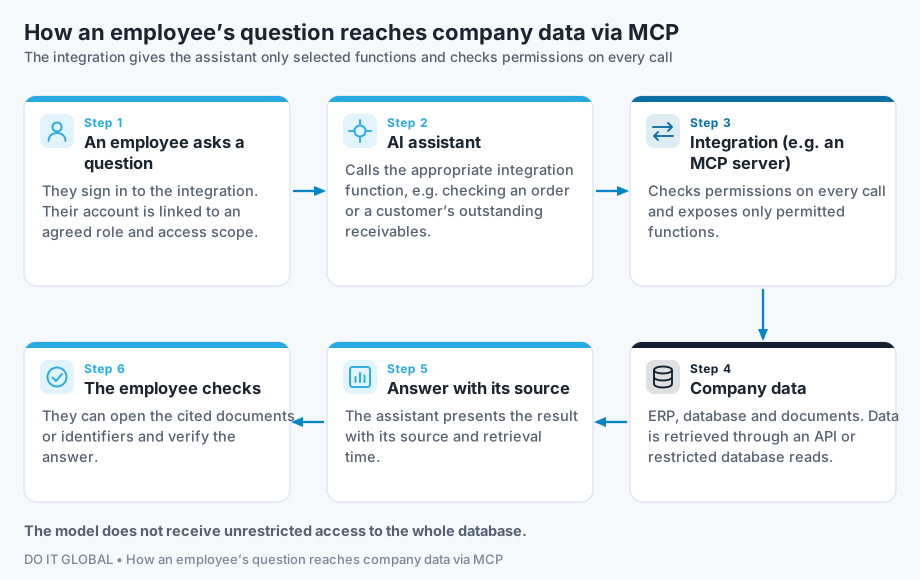
The model does not receive unrestricted access to the whole database. MCP itself does not grant permissions or guarantee accurate answers: access rules, tests and source citations are part of the integration design. Standard documentation: modelcontextprotocol.io.
The integration method depends on the assistant, its licence and the system version. Read more about connections to ERP and databases.
Who can access the data and where is it processed?
Each user group receives access to the information needed for its work. We define the rules based on roles and permissions in your company. Before launch, we also test attempts to obtain data outside that scope.
The assistant described here is for searching and reading. Creating orders or changing data requires extending the project to include approval rules and handling for those actions.
With a cloud model, the required portions of information are sent to the provider’s service. Before choosing a solution, we define where processing takes place, storage rules and what usage is logged. A local ERP or MCP server does not mean the model also runs locally.
If data needs to stay at your company, we consider private AI, including an offline option. This requirement then covers the whole data flow: the model, search and document storage.
How do we start and how much does implementation cost?
During a free consultation, we select a few questions where a quicker answer would make work easier for your team. We check the answer sources, the AI tools you use and your data requirements.
The first stage covers a limited set of questions and a small group of users. We agree how to check answer accuracy, freshness, permissions and the time needed to find information.
If feasibility is clear, we prepare an implementation proposal. Where there are unknowns, we suggest a separately priced test or process analysis. The price depends mainly on data sources, access rules and the scope of questions. We show licence, model and infrastructure costs separately. See how we work and the option of support after implementation.
Content updated:
Information reviewed: