

You want to ask an AI assistant about an order’s status or a customer’s outstanding receivables. But the information is in your ERP. Does your team have to copy it into the chat every time? An MCP server lets you set up a connection through which the assistant can use selected data and functions in your company’s system. It can then retrieve the information it needs to answer, without an employee having to copy it manually.
Your ERP can stay where it runs today. What matters is deciding what you will make available to the assistant and where the retrieved information will be processed. We explain how this connection works, how a setup for one person differs from access for a team, and what determines your control over the data.
What is MCP and what is an MCP server?
MCP (Model Context Protocol) is an open standard that lets AI applications use data and functions from other systems, such as ERP. The documentation compares it to USB-C: just as a common connector makes it easier to connect devices, MCP defines a common way for AI applications to communicate with external systems.
To use it in your company, you need an MCP server, a program that gives the assistant access to selected data and functions in your company system. This could include checking an order’s status or a customer’s outstanding receivables. What the assistant can do depends on how the integration has been set up and which permissions it has been given.
How does a question in a chat reach the ERP?
Suppose an employee asks the assistant: “What stage is this customer’s order at?” If the integration has been set up for this task, the assistant can use an order-checking function made available by the MCP server. The application passes on the request, the integration reads the data from the ERP, and the result returns to the assistant. The assistant can then use it to prepare an answer for the employee.
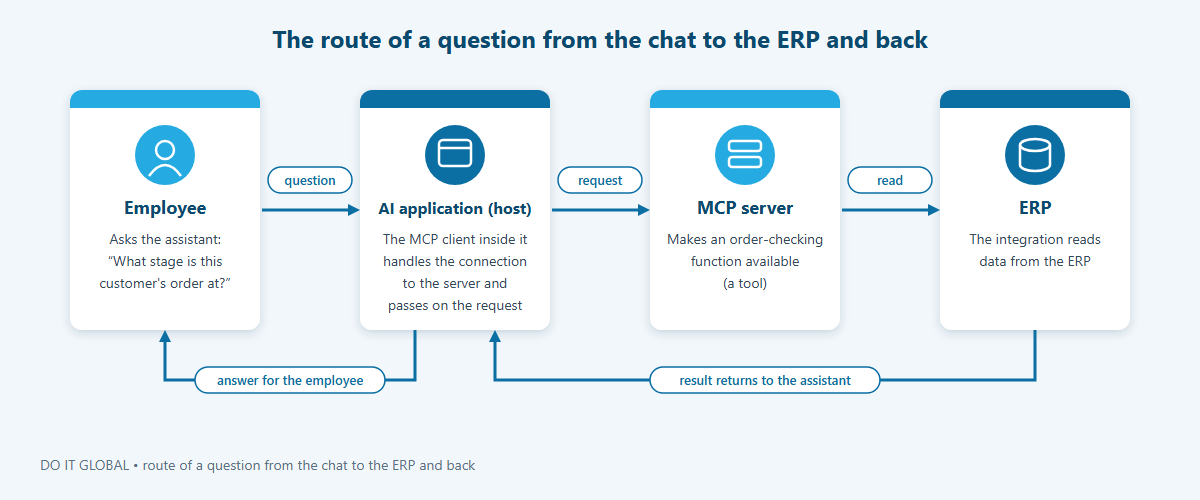
In the documentation, you will find three names for the participants in this exchange. The AI application is the host, the part that makes the connection. The MCP client inside it is the connector that handles the connection to the server. The MCP server itself makes functions and data available for the application to use.
What can the server make available?
Checking an order’s status is an example of one of the three types of elements available in MCP:
- Tools carry out specific tasks, such as retrieving an order’s status from the ERP.
- Resources provide data or information to read, such as a description of the database structure.
- Prompts are ready-made instruction templates, for example with examples of how to use the available tools.
A server can make selected elements available. When connecting it to an ERP, the key is to choose them to suit your team’s questions and tasks: what information the assistant should retrieve and what actions it should be able to carry out.
How do ChatGPT, Claude and Copilot connect to an MCP server?
Local or remote server: what does it mean for your company?
Your ERP can still run on a server inside your company, with its database inaccessible from the internet. What you need to decide is where to run the MCP server and how the assistant will connect to it.
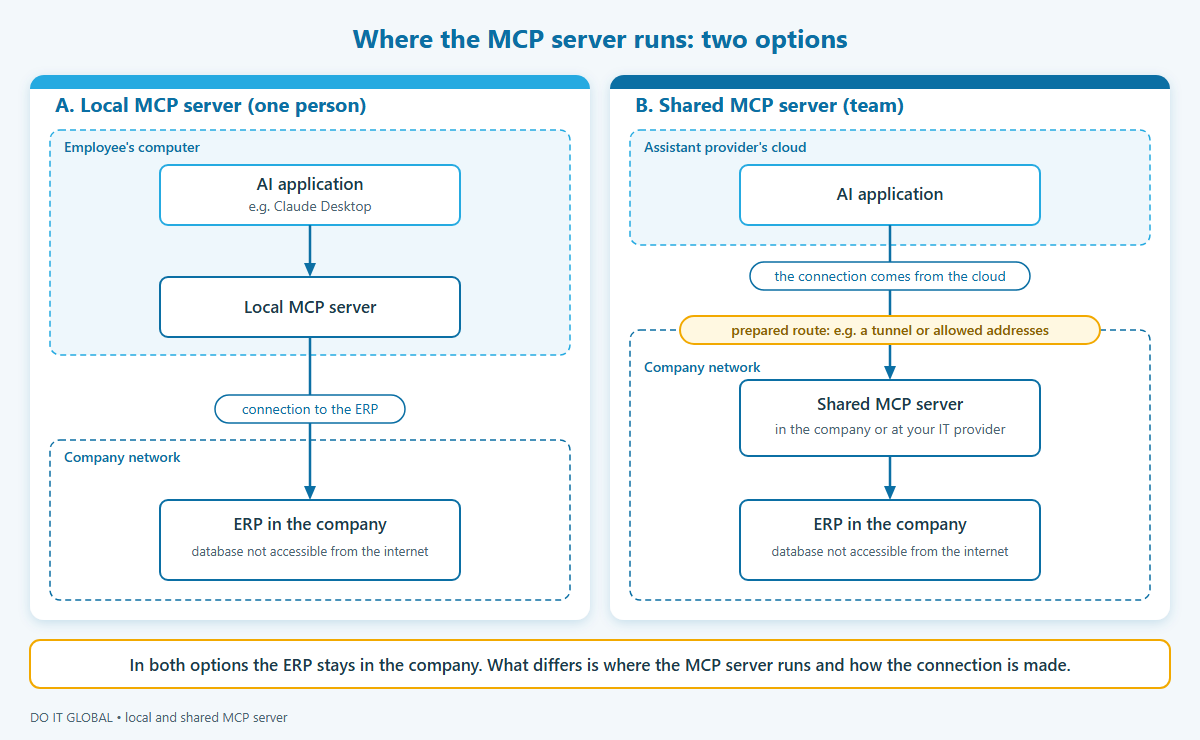
If you want to start with a trial on one computer, you can run a local MCP server on a computer with an application such as Claude Desktop. The computer must have access to the ERP, and the integration must have the permissions needed to carry out the tasks you make available.
What if the whole team needs to use it? Then it is worth considering a shared MCP server available over the network. It can run inside your company or at your IT provider. Calling it a “remote” MCP server describes how it is reached, not where it runs, so you do not have to move it outside your company.
With this setup, it matters where the connection comes from. For example, Claude’s remote connector contacts the MCP server from Anthropic’s cloud. So an employee’s access to the ERP from an office laptop does not mean that the cloud connector can reach the MCP server. You need to provide a route to the MCP server that suits your chosen AI application.
What does each assistant support?
A shared standard makes integration easier, but how you add a server and manage access depends on the application. For Microsoft, we describe the agent in Copilot Studio here.
| Assistant | How does it use an MCP server? | What should you take into account in deployment? |
|---|---|---|
| ChatGPT | Connects to your own server through an HTTPS address or Secure MCP Tunnel, which provides access to a private server without making it publicly available. | Adding and using a server is subject to the rules for your account and your company’s workspace. OpenAI documentation. |
| Claude | The remote connector connects to the server from Anthropic’s cloud. | You need to ensure that the connector can reach the server. In Team and Enterprise, the organisation’s owner makes connectors available to the organisation. Claude documentation. |
| Copilot Studio | The agent uses tools and resources from the connected MCP server. | Setup includes connecting the server to the agent and enabling generative orchestration, which lets the agent choose tools for the task. Microsoft documentation. |
Product capabilities and access rules change, so it is worth checking them for your specific account and company configuration before deployment.
You also need to decide what information the assistant should receive. If a cloud-based model prepares the response, it may receive data retrieved by the MCP server.
What does an MCP server for ERP look like?
It is worth starting the project with the questions your team asks every day. Does a sales rep need to check progress on an order? Do they look up a customer’s overdue payments before a call? These needs determine which tools we build and which data we make available. The first version can include a few functions that help with day-to-day work.
Which tools should you make available to the assistant?
Each function should have a clear purpose and return the data needed for the task. Here are some examples of tools you can build for a team that uses ERP:
| Tool | Example team question | What should it return? |
|---|---|---|
| Order status | “What have we already dispatched from this order?” | Fulfilment stage and the related goods issue documents. |
| Customer’s outstanding receivables | “What did this customer owe us at the end of the month?” | Amounts as at the specified date, payment due dates and source documents. |
| Customer’s purchase history | “What did this customer buy last quarter?” | A summary of purchases over the selected period, applying the agreed rules for accounting for corrections. |
| Stock availability | “How many units can we offer the next customer?” | The available quantity after reservations, in line with your company’s rules. |
Behind each question are business rules you need to agree on. What exactly do you include in receivables? How do you account for corrections in purchase history? The calculation rules are set up in the ERP or the integration. The assistant uses the resulting figures to prepare an answer for the employee.
It is also worth ensuring that the results include source document numbers and the time the data was retrieved. The employee can then check where the information came from and when it was retrieved.
We match the scope of the data to the logged-in user’s permissions. If this is how your company’s rules work, a sales rep will receive information about their own customers, while a manager will receive information about the whole department. The integration should check this access every time a tool is called.
How does the server get data from the ERP?
The server can use an API, the interface that lets software communicate with the ERP, or another method provided by the vendor. Some systems also allow controlled read access to the database, limited to selected data. We choose the right approach to connecting AI to your ERP and databases after checking the system version, access options and licensing terms, before we provide a quote.
We give the assistant access to specific business functions. It cannot run arbitrary database queries. The integration account has only the permissions needed for its tasks. MCP best practices.
We recommend starting with read-only access. You can add the ability to create a draft order at a later stage, with an agreed process for approval by an employee. Writing data to the ERP should use an interface or import method supported by the vendor, so that the ERP’s rules remain in place.
Is an MCP server safe?
The security of an MCP server depends on the integration design, not on the protocol itself. Connecting your ERP to an assistant therefore means deciding who gets access, what they can do and where the data goes.
What the protocol provides and what the design must provide
The MCP specification sets out the rules, but the protocol itself cannot enforce them. The people building the integration should implement consent, authorisation, access control and data protection.
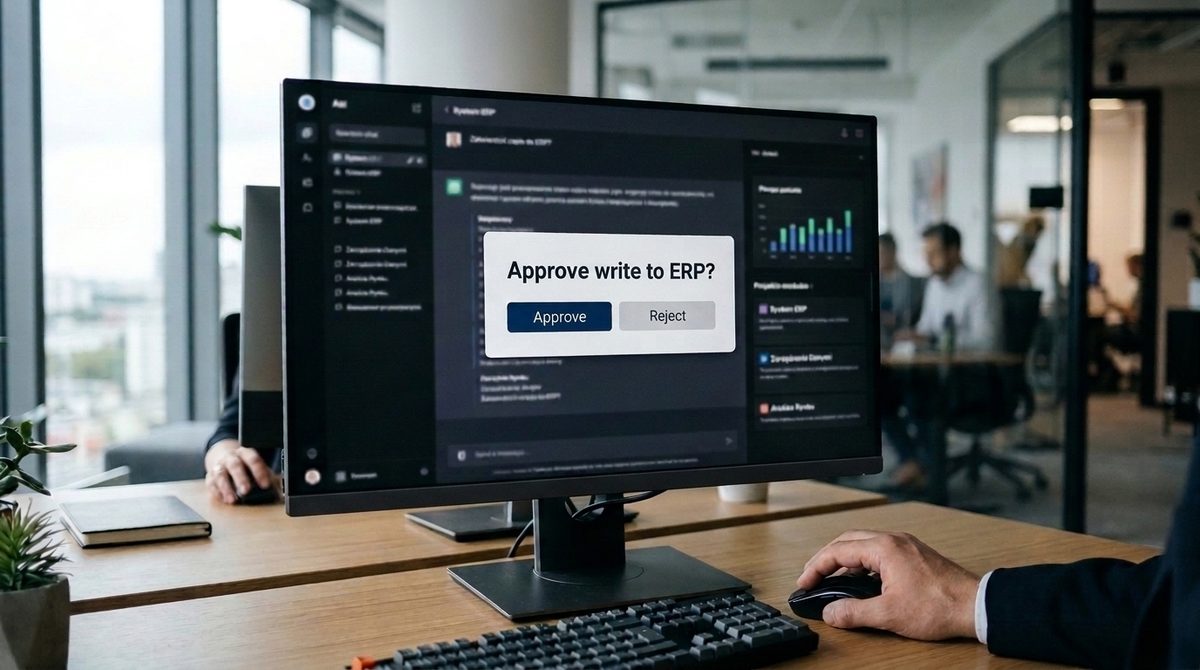
MCP requires AI applications to obtain explicit user consent before sharing data with a server and calling a tool. The user should be able to refuse an operation. ChatGPT requires manual confirmation in the conversation before a write action. This does not, however, replace restrictions within the ERP.
Authorisation is optional in MCP, so it needs to be deliberately implemented. A server available over the network should use OAuth 2.1, the standard for sign-in and granting access. It must check that the token, a digital pass, was issued specifically for it; it must not accept or pass on other tokens.
According to the specification, the server should also validate inputs, control access, limit the number of calls and sanitise results. The AI application should log tool use so that operations can be traced later.
The main risks and how to reduce them
- Overly broad access. Narrow functions and read-only access at the start limit the impact of an error or a stolen token. With an administrator account or full database access, a stolen token gives access to everything. Further permissions are added only when they are needed.
- The “read-only” label. This is a declaration by the server, not a guarantee: OpenAI’s documentation warns that write actions may still occur. That is why we suggest an integration account and database views restricted to read-only access.
- Instructions hidden in data. A product description, email or document may contain malicious instructions for the model. This is known as prompt injection: an attempt to make the assistant disclose data or take an unwanted action. Narrow tools, approval of write actions by a person, and keeping ERP data and untrusted MCP servers out of the same conversation help reduce this risk.
- Unverified software. When you run a ready-made local MCP server, it has the AI application’s permissions. Malicious software may execute arbitrary code or steal data. Recommendations include showing the exact launch command, obtaining user consent and using an isolated environment. OpenAI does not create or verify the servers that users connect.
- Data outside your company. As the OpenAI documentation on MCP points out, any server may receive sensitive information in queries. A cloud-based model, in turn, receives portions of the data retrieved to answer a question, even when the server runs inside your company. You therefore need to make deliberate choices about which information is shared. If it cannot leave your company, one solution may be private AI that runs inside your company.
Checklist before you connect your ERP to an AI assistant
You can work through these questions with your integration provider or your IT specialist. They will help you establish whether the connection is ready to work with your company’s data.

- Which questions from your team should the assistant answer, and what data does it need? This should determine the scope of access. The aim is not to share the entire ERP database, but to provide the information needed for specific tasks.
- Which tools will the server provide, and do any of them write data to the ERP? Checking an order’s status is different from changing data. Writing data needs separate consideration because it carries greater risk.
- Who will sign in, and will their permissions be checked every time a tool is called? A sales rep should not be able to see more through the assistant than they can in the ERP.
- Which account will the server use to read ERP data, and does it have read-only access? Labelling a tool “read-only” is a declaration by the server. The account’s database permissions should also enforce this restriction.
- Where will the server run, and how will the assistant reach it? The connection may use a public address, a tunnel or a list of allowed IP addresses. This determines whether the server is visible from the internet. ChatGPT offers Secure MCP Tunnel for a private server; Claude connects from Anthropic’s cloud, and access can be provided by allowing specific IP addresses or using a private network option.
- Where does the model run, what data will it receive, and what settings apply to your company’s account with the assistant provider? Having the server inside your company does not mean the model also runs on site.
- Who will approve write actions, and which approval settings will be enabled? ChatGPT requires manual confirmation before writing data. In Claude, connector permissions can be set to “always allow”, “requires approval” or “blocked”.
- Will tool use be logged, and who will review the log? The MCP specification provides for this logging for audit purposes. A log alone offers little value if no one checks it.
- Who will update the server and be responsible for it after deployment? It is software that needs maintenance, just like your company’s other systems.
- How will you test the accuracy of answers and attempts to access data beyond the user’s permissions before going live? Tests should demonstrate both correct answers and refusal to share data the user should not see.
When do you not need an MCP server?
If you want to use AI in your company, you do not have to start by building your own MCP server. Sometimes there is a simpler way to answer your team’s questions. A custom connection makes sense when it meets a specific need that ready-made tools cannot.
The first option may already be in your ERP. Comarch’s ChatERP assistant is built into its systems and lets you talk to the system in natural language and check current data in real time. It can also perform tasks such as creating an order, approving an invoice or blocking a transaction with a counterparty. If your company works only in this one system, can use such an assistant in it, and the vendor’s assistant answers your team’s questions, you may not need your own MCP server.
How often these questions come up matters too. Do you need to analyse receivables just once, or compare sales results occasionally? A report or an export from your ERP will usually be enough. Not every question you ask AI needs a permanent connection to the system.
It is also worth establishing where AI should help. Your team may not need a separate chat, but suggestions in the form or window they already work in. In that case, AI features in the application your team already uses will be a better fit. This is a different kind of solution from giving an assistant access to data through MCP.
Your own MCP server is useful when an answer requires data from several systems, your ERP runs on a server at your company, or your company has its own rules for permissions.
If you are building this kind of solution for your customer, we can help through our cooperation with IT companies.
Frequently asked questions
Is MCP the same as an API?
No, an API is the interface for a specific system, while MCP is an open, shared standard that lets an AI application discover and call the functions made available to it. An MCP server provides tools, resources and prompts, and often uses an API or the ERP database behind the scenes. One server can work with different assistants that support MCP, including ChatGPT, Claude and Copilot Studio agents.
Can I use a ready-made MCP server from GitHub with my ERP?
Yes, for tests using test data, after checking the code and its author. A local MCP server is a program that runs with the permissions of the AI application or the account you use to run it. The MCP security documentation warns about malicious code and data leaks. OpenAI does not create or verify servers connected by users.
A general-purpose “database” server usually allows actions such as running arbitrary queries. For your company, narrowly defined tools with permissions checked for each user will be a better fit.
Will an MCP server work with an ERP that runs on a server in my company?
Yes, an MCP server can run on your company’s network, alongside the ERP. However, it needs a connection: an assistant in your browser connects from the provider’s cloud. For Claude, the server must be reachable from the internet, or you need to allow Anthropic’s IP addresses or use a private network option. ChatGPT can use a public HTTPS address or Secure MCP Tunnel, without exposing the private server publicly. The ERP database itself stays behind the MCP server. You do not make it available on the internet.
Can an assistant create orders or change data through MCP?
Yes, MCP server tools can also change data, but we suggest starting with read-only access and minimal permissions. We treat writing data as a separate scope of work, with approval by an employee and data written through an interface or import process supported by the ERP vendor.
The MCP specification allows a person to refuse a tool call. ChatGPT requires manual confirmation of write actions, and in Claude you can set the connector permission to “requires approval”.
Does ERP data go to OpenAI, Anthropic or Microsoft through MCP?
Yes, the pieces of data that a tool returns to the conversation go to the assistant provider’s model. We limit their scope through the design of the tools. The processing terms depend on your company account’s plan and settings. We check them before deployment.
If data cannot leave your company, one solution may be private AI, that is, a model that runs inside your company. When an external company processes personal data, a data processing agreement is needed.
How much does it cost to deploy an AI assistant with access to my ERP through MCP?
The price depends on the data sources, your team’s questions, the number of user roles and the integration method. Once these are defined, we prepare a quote. Assistant or AI model licences, infrastructure and any ongoing support cost extra. When there are many unknowns, we start with a limited test priced separately. The first call is free.
What can you do next?
If you are wondering whether MCP makes sense for your company, we suggest a free call online (30–45 minutes). We will talk about what information your team most often looks for in the ERP, which assistant your company uses and what requirements you have for data. It will help to bring a few team questions that are hard to answer quickly today.
If you would like to get to know our approach first, our page on an AI assistant on your company’s data describes how we build this kind of solution.