
Connecting ERP with CRM, email and business applications
An ERP system manages areas such as sales, stock and orders. CRM software supports customer relationships and sales opportunities. Connecting them can give a salesperson access to order status in the program they use every day.
Information entered once can support the next steps in customer service. Integration makes it available in the right program, giving your team more time to handle enquiries and orders. For example:
- Orders from email to ERP. Data from messages and attachments becomes a draft for a member of staff to check and approve. See order processing automation.
- Order status updates from ERP to CRM. The person helping a customer sees the information they need in their own program, without asking another department each time.
- ERP data for your business applications. Products, prices or customer information are used at the next stage of the process without being entered again.
- Reports from several sources. Data from databases, files and applications feeds into a report instead of being gathered manually in a spreadsheet.
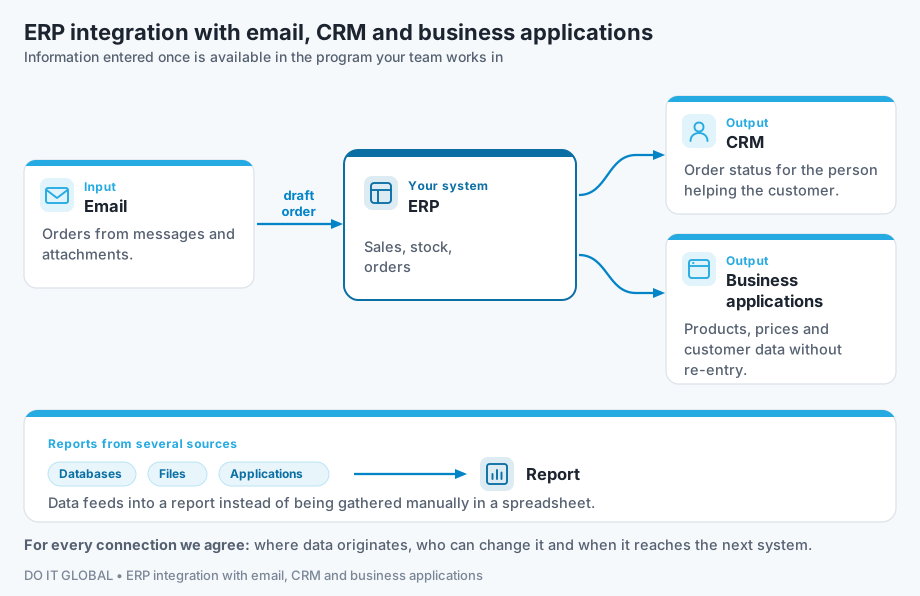
We choose the connections needed for a specific task. We agree where data originates, who can change it and when it should reach the next system.
Example scenario: order status in CRM
A customer asks about an order. In the CRM, the salesperson sees the customer’s details, delivery status retrieved from the ERP and the time of the last update. They can respond sooner and discuss the next steps, while the warehouse receives fewer questions about information already in the system. We choose the data scope and update frequency to suit how the business works.
Integration or a new application?
This service covers data exchange between programs you already use. If you need a new application to manage a process, see custom software development.
We design and develop custom components where a connection or the necessary rules are missing. This might include exchanging data between an ERP and a custom application, or handling documents that need several stages of checking.
AI integration with ERP: when does it make sense?
Data exchange rules are usually enough to transfer an order number, price or status. AI can help read a customer’s message, extract data from a PDF or match different descriptions of the same product. Examples include email orders to ERP and preparing quotations using ERP data.
The integration checks the prepared data against agreed rules and passes it to the appropriate program. Missing information and ambiguous matches are referred to a member of staff.
If you want to ask questions about information stored in systems and documents, see an AI assistant using your company data. Adding AI features to an existing application is covered on the AI in existing software page.
AI in the ERP you already use
Automation or AI can often be added to a process managed in your current ERP. We first check the program’s features, add-ons and existing integrations. If they solve your problem, we help you use them. We connect the extensions you need through the mechanisms available in the ERP:
- The vendor’s API or SDK. Examples include Sfera for Subiekt GT, which requires the relevant add-on, and Sfera available in Subiekt nexo PRO. Documents are then created using the program’s own mechanisms; the integration checks the required fields and rules.
- File imports and exports in formats supported by the program.
- Reading from a database, such as Microsoft SQL Server, where the vendor’s terms and licence allow it. We restrict access to the necessary data, for example through selected views and an account with read permissions. We create documents through an interface or import supported by the ERP.
Before quoting, we establish which data needs to be read and what should be created in the other system. We check:
- the specific product, version and configuration, such as Subiekt GT or nexo PRO, WAPRO Mag, enova365, Comarch ERP Optima or Comarch ERP XL,
- the licence and modules required for integration,
- the available interfaces and their documentation,
- whether the connection can be tested without affecting daily operations.
How do we keep data exchange accurate?
We also design the integration for situations where data is incomplete or a program does not respond. We agree:
- Data and duplicate checks. What must be correct before information is transferred, and how to recognise a task that has already been processed.
- Handling interruptions and errors. When to retry, what to leave in the queue and who should be notified.
- Access and permissions. Which information the integration can read and which actions it can carry out.
If a source system is unavailable, the solution indicates that the data could not be refreshed. We test how these interruptions are handled. When AI is used, we define which data goes to the model and where and under what terms it is processed. If data must remain within your business, we consider private AI on a server at your premises.
How we start and price an integration
During a free consultation, we discuss which flow of information would make work easier for your team and which systems it uses. If the integration method is known, we prepare a proposal with the scope, price and acceptance criteria. Where we need to check the program’s capabilities or data quality, we propose a separately priced feasibility assessment.
The cost depends on the connections needed, exchange rules and exception handling. We show licences, infrastructure and any use of AI models separately. After implementation, we can provide maintenance and further development.
See how we work. If you are unsure which area to improve first, start with process analysis. IT companies and ERP partners can commission an integration for a client project: see working with us as a partner.
Content updated:
Information reviewed: