
When is it worth improving purchase invoice checks?
Automatically matching an invoice to a purchase order and goods receipts gives an employee a starting point for checking it. They can see matching lines and move on to those that need their judgement. The solution helps your team:
- compare an invoice with several deliveries and account for quantities received,
- link different product names and codes,
- identify differences in prices, quantities and additional charges,
- flag missing documents and direct the case to the right person.
We adapt the scope to your purchasing rules and existing software features. An employee checks the result and decides whether to approve the invoice.
Automatically comparing invoices with purchase orders and deliveries
- We retrieve data for comparison. We use invoices in your software or build the required KSeF integration.
- We link related documents. The system matches the supplier, purchase orders and deliveries using the available data.
- We check the lines. We compare products, quantities and prices using agreed rules and tolerances.
- We show the result to a member of staff. They see matching items, discrepancies and source documents, and decide whether to approve the invoice or investigate further.
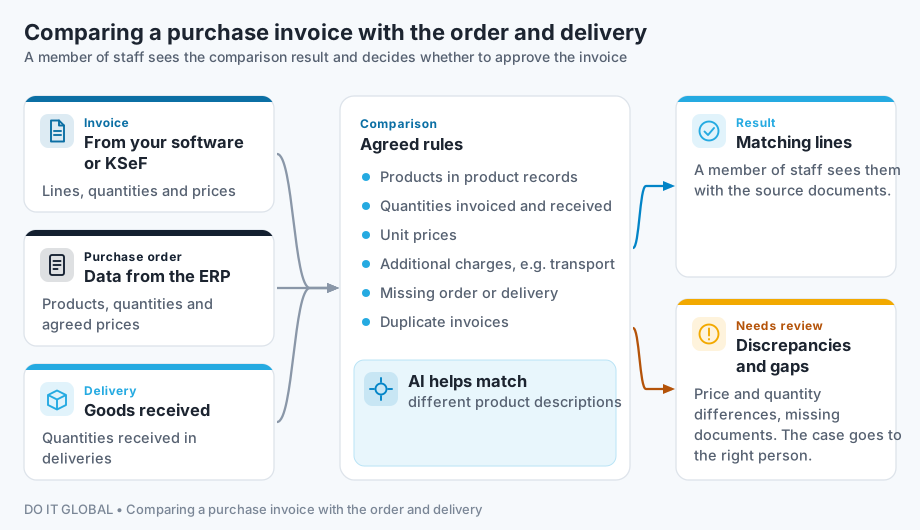
We agree who clarifies each type of discrepancy and how an approved invoice moves through your ERP workflow.
What do we check on an invoice?
We choose the checks based on your business’s documents and rules. They can cover:
| Element | What we compare or flag |
|---|---|
| Products | Linking invoice lines to product records and the purchase order |
| Quantities | Quantities invoiced and received in deliveries |
| Prices | Unit prices on the invoice and purchase order |
| Charges | Additional costs, such as transport, and whether they match agreed terms |
| Document links | A missing purchase order or delivery document |
| Duplicates | Whether the same invoice has already entered the workflow |
Amounts and quantities are checked using agreed rules, for example accounting for units of measure and tolerances. AI can help match different product descriptions or read documents received outside KSeF. Uncertain matches are referred to a member of staff for checking.
Example comparison result — fictional data
Purchase invoice FZ/412, purchase order ZZ/388 and goods receipt documents PZ/291 and PZ/297. We compare prices excluding VAT and the quantities allocated to this invoice, accounting for deliveries already reconciled. Illustrative GBP unit prices are rounded to the nearest penny; differences are calculated from the prices shown.
| Item | Invoice — excluding VAT | Purchase order and goods receipts | Result |
|---|---|---|---|
| Steel section 40×40×2 mm, length 6 m | 120 pieces × £42.11 | Ordered: 120 pieces × £42.11; received: 80 + 40 pieces | Quantity and price match |
| Steel sheet 2 mm, 1000×2000 mm | 30 sheets × £85.95 | Ordered: 30 sheets × £84.79; received: 30 sheets | Price higher by £1.16 per sheet, £34.80 in total |
| M8×30 bolts, grade 8.8 | 500 pieces × £0.23 | Ordered: 500 pieces × £0.23; received: 400 pieces | Receipt of 100 pieces not confirmed in the available goods receipt documents |
| Transport | £43.56 | No charge in the purchase order | Cost to be checked against the agreed purchase terms |
A purchasing team member checks the sheet price and transport charge, while the warehouse confirms whether the remaining bolts arrived and their receipt was recorded. A missing receipt record may mean incomplete data in the system rather than a missing delivery. The comparison helps direct the issue to the right person; invoice approval remains with a member of staff. This is a fictional example, not an implementation result.
How much time could your team regain?
Illustrative calculation, not a client result
400 invoices a month at 6 minutes per check require 40 hours of work.
If 60–80% of invoices need one minute of checking after automatic comparison, while the rest still take 6 minutes, the team regains around 20–27 hours a month.
This is an estimate based on the stated assumptions. Using your documents, we check the time spent reviewing, correcting and clarifying differences. We assess the value against implementation, tool and maintenance costs. Time regained can help you handle more work; it does not automatically mean financial savings.
Retrieving purchase invoices from KSeF and data from ERP
You can receive purchase invoices through free tools provided by Poland’s Ministry of Finance, such as the KSeF Taxpayer Application, or through software integrated with KSeF. The Ministry describes ways to receive invoices in KSeF. At higher invoice volumes, software or an integration retrieves them automatically through the KSeF 2.0 API:
- New invoices enter the comparison queue. The integration periodically retrieves document packages made available since the last synchronisation. The schedule accounts for API recommendations and limits; after a connection interruption, retrieval resumes from the saved point.
- XML instead of reading an image. Invoices have a structured data format, so reading them does not require OCR. Their lines still need to be linked to purchase orders and goods receipts in the ERP.
- Checking for repeat retrieval. The KSeF number identifies a document that has already been retrieved. We also check whether the invoice entered the workflow through another route, such as a PDF from the supplier.
- Authentication and permissions. We configure access to your business’s invoices using a method supported by the API, such as a KSeF token or certificate. Permissions match the integration’s tasks.
Technical details are covered in the API documentation for integrators and the Ministry of Finance guide to incremental invoice retrieval. These sources are in Polish.
If your ERP already retrieves invoices, we first check whether we can use that workflow. We read purchase orders and goods receipt documents from your business systems. The supplier’s WZ document records goods issued on their side; a PZ document in your ERP records goods received by your business. We choose documents that confirm quantities actually received; a WZ alone does not establish whether the entire delivery was received.
Comarch ERP Optima and InsERT’s Subiekt nexo already help link purchase invoices to goods receipts. If you use this feature, we check its scope and add only the missing elements your team needs. This could mean comparing the invoice with the purchase order and goods receipt documents (PZ) line by line, or applying agreed tolerances, such as those for price rounding. A description of discrepancies can show what differs and why, helping your team clarify the issue with the supplier.
Invoices outside KSeF, such as PDFs from overseas suppliers, can be included in the same process. We choose how to read them based on the documents. If you need to connect your own application to KSeF, see custom software and KSeF API integration.
How we start and price the implementation
We start with a free conversation about how your team checks invoices. We then review sample invoices, purchase orders and delivery documents, including more difficult cases. We agree comparison rules and how discrepancies will be handled.
We check the specific ERP: its product, version, licence and data access options. See how we connect to the ERP you already use.
Indicative implementation costs are £4,360–£7,260 excluding VAT. The price depends on the systems, available data and comparison rules; more complex integration may cost more. With a clear scope, we prepare a proposal. If we first need to assess the system’s capabilities or document handling rules, we propose separately priced process analysis.
We test the solution alongside your existing invoice processing. We compare results, checking time and the number of corrections. We also prepare staff to use it.
Before connecting systems, we agree access and where data will be processed, along with the model’s terms of use if AI is involved. Post-implementation support is agreed separately. See the stages of working with us.
Content updated:
Information reviewed: