

The order has reached your company, but it does not yet exist in your ERP. Email order automation aims to shorten the time an email waits for an employee to open the attachment, recognise the names the customer uses and retype the order lines into the system. The team is busy and the inbox is gradually emptying, so it is easy to assume that everything is working. Only when order volumes rise or an experienced team member is absent does it become clear how much depends on this manual work.
At 50 orders a day and five minutes each, retyping them alone takes over four hours. Sales growth then means not just more revenue, but also a longer queue of orders waiting to be entered before fulfilment can even begin. Read on to find out how data from emails can reach your ERP without retyping, what an employee still needs to check and when this change pays off.
How much does retyping orders by hand really cost?
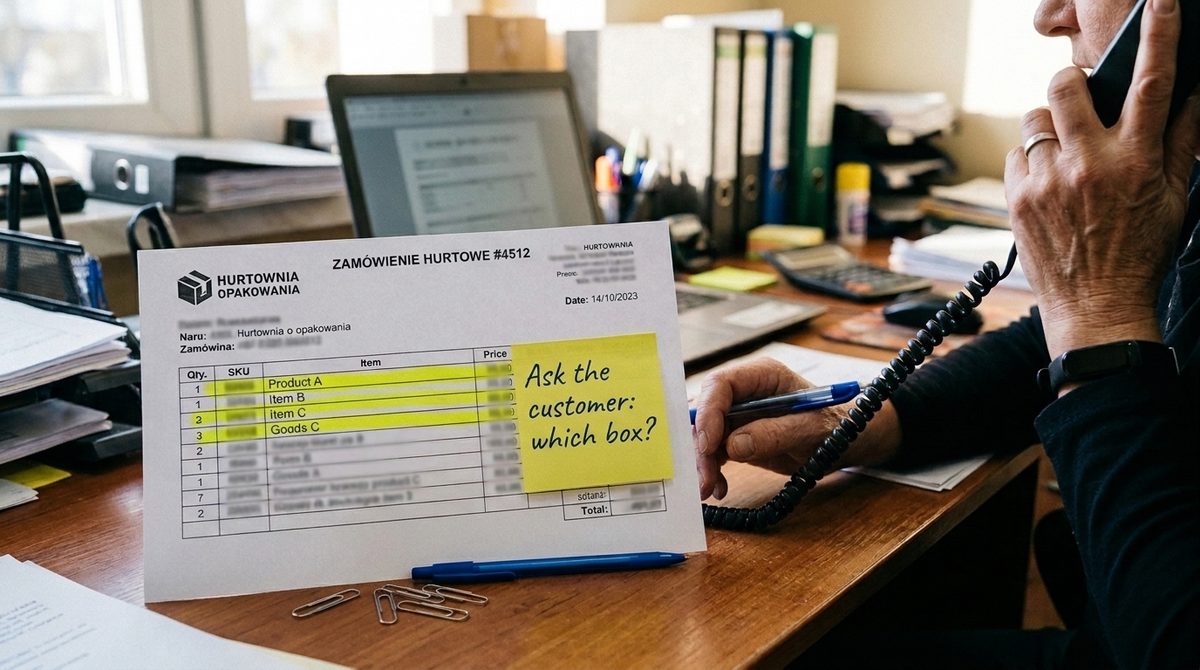
A few minutes spent on each order are easy to overlook in your business costs. An employee opens an email, checks a PDF or Excel file, and searches for the product in the ERP by name or by the customer’s own code. If anything is missing, they ask the customer. Only then do they save the order. Each step takes little time, but repeated dozens of times a day, it adds up.
You can calculate the cost by multiplying the number of orders per month by the time spent on each order in hours and by the hourly cost of work. For this example, we will assume 21 working days per month, 5 minutes per order and about £15 per hour of work. The monthly figures look like this:
| Orders per day | Working hours per month | Monthly cost |
|---|---|---|
| 20 | 35 h | about £530 |
| 50 | 87.5 h | about £1,310 |
| 100 | 175 h | about £2,630 |
At 100 orders a day, that is roughly one full-time job. It need not be one person’s job: the time may be spread across several employees, making it less visible.
The table does not include the cost of mistakes in item codes (the product codes in your ERP) and quantities that lead to complaints and returns, or delays in fulfilling orders left waiting in the mailbox. Nor does it show how much depends on the person who knows the customers: when they are on holiday or off sick, someone less experienced retypes the orders.
Your own calculation starts with a week of measurement. During that week, the team records the daily number of orders, their format and the time from opening the email to saving the order in the ERP, including product searches and questions to the customer. They record any later corrections and mistakes separately. You multiply the average daily number of orders by the number of working days in the month, replace the 5 minutes in the example with your average time per order, and replace £15 with your hourly cost of work.
Where do orders come from, and what can you do without AI?
Two orders in the same mailbox can need completely different handling. One contains a ready-made list of item codes and quantities; the other is a request you need to interpret. Before choosing how to get email orders into ERP, it is worth checking which formats your customers use.
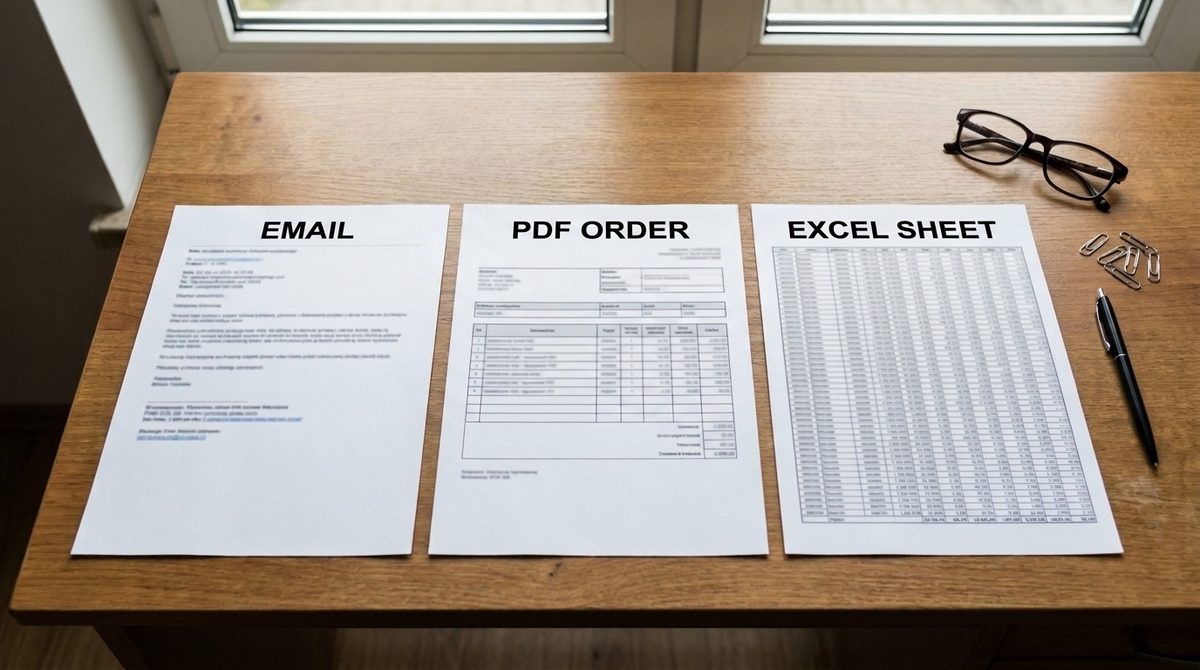
| Order format | What makes it difficult | What works without AI | When AI is needed to read it |
|---|---|---|---|
| Text in the email body, written in the customer’s own way | “Same as last time, plus 10 cartons of gloves”; names rather than item codes | Retyping is still needed | When there are many orders like this |
| PDF from the customer’s system | Each customer has their own layout | A reading template for a customer who always sends the same layout | When many customers send their own PDFs |
| Excel file using your company’s template | The customer must stick to the template | File import | Usually not needed |
| Excel or CSV file in the customer’s layout | Different columns with different meanings | Converting a regular customer’s file | When there are many layouts or they change |
| Scan or photo | Handwriting, poor quality | Standard OCR (software that reads text from scans) can read the text, but cannot match it to item codes in the ERP | Almost always |
| B2B ordering portal, EDI (electronic data interchange between companies’ systems) or online shop | Transferring the data to the ERP | A connection to the ERP, because the data is already digital | Not needed |
The simplest case is a regular customer who sends an Excel file using your template: importing the file is often enough. That does not mean, however, that the ERP will accept the Excel file itself. For example, XML document import in Comarch ERP Optima (in Polish) supports the customer reservation (RO, Optima’s name for a customer order) and identifies the counterparty by code, tax number (NIP, the Polish tax identification number) or GLN (Global Location Number). The file must first be converted to the required XML format; only Comarch Authorised Partners receive the description of its structure.
A B2B ordering system, EDI or an online shop passes on data that is already digital: you need a connection to the ERP, not a way to read the data. Retail chains, for example, place orders this way.
AI makes sense where you need to interpret what a customer has written or read different document layouts. This usually applies to some customers, not all of them. You can therefore group the orders collected during the week of measurement by format and count each group. Each may take a different route into the ERP.
How does email order automation into your ERP work?
What happens to an order, step by step
The order arrives in a separate mailbox, such as the order desk’s address. The solution has access only to this mailbox; the rest of your company’s email stays out of reach. In Microsoft 365, an administrator can restrict an application’s access to selected mailboxes and give it permission only to read emails. They must also remove any broader permissions granted previously.
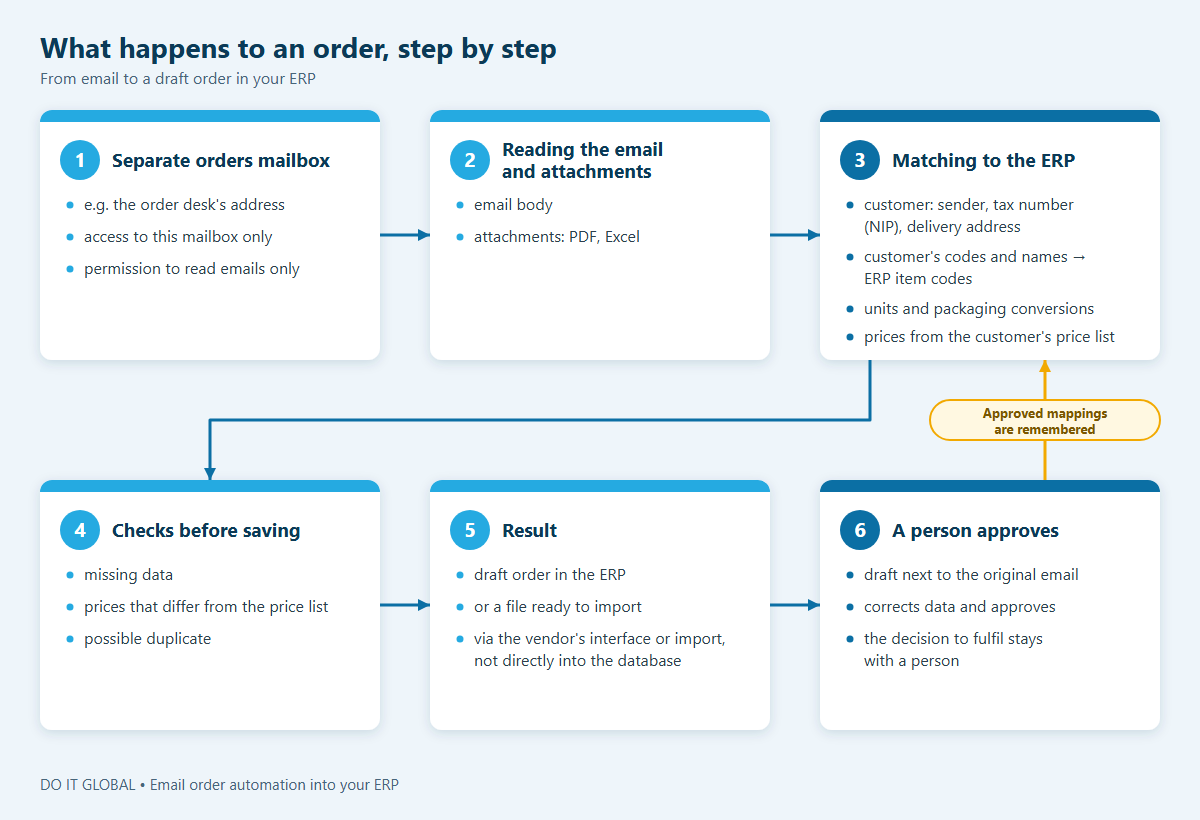
The solution reads the email and its attachments. Then comes the part that currently takes staff so much time: matching the data to your ERP. The solution identifies the customer by the sender, tax number or delivery address. It maps the customer’s own codes and product names to item codes in the ERP, matches units and applies unit and packaging conversions (how many pieces are in a carton), and takes prices from the price list assigned to that customer.
There is no need to look up the same information afresh for every order. The solution remembers the mappings approved by a member of staff, so subsequent orders from that customer need fewer and fewer corrections.
Before saving, the solution checks for missing data, prices that differ from the price list and possible duplicate orders. The result is a draft order in the ERP or a file ready to import. A member of staff sees the draft alongside the original email, corrects any data that needs changing and approves it. Automated order entry takes over the tedious work of matching information, but not the decision to fulfil the order: that stays with a person.
How the solution connects to your ERP
Your ERP stays in place. The draft is saved through an interface or import method supported by its vendor, rather than written directly to the database. This means the order goes through the same software rules as one entered manually.
The route depends on the system. In Comarch ERP Optima, it is the XML file import described above. In Subiekt nexo PRO, custom solutions can be built using Sfera, described in the nexo SDK. Meanwhile, enova365 provides WebAPI for exchanging data with other applications, licensed as an add-on module.
Before we give you a quote, we therefore check the connection to the ERP you already use: the available integration route, your software version and the licences needed. If a connection is unavailable or costs too much, a simpler option remains, provided your ERP supports document imports: the data goes into a file, which a member of staff checks and imports. Instead of retyping the order lines, they check the completed file.
Where does email order automation get it wrong, and how do you handle it?
What seems obvious to an experienced employee may not be explicit in an order. Your team knows which product the customer means and where to send it. Automation needs a clear rule, a saved match or a human decision.
- The customer’s own codes and product names. A name such as “large film” could refer to several products. If there is no single clear match, an employee chooses. Once approved, the match is used for that customer’s future orders.
- Cartons and pallets rather than pieces. The customer orders five cartons, but the ERP counts the product in pieces. You agree unit and packaging conversions for specific products with your team in advance, because a “carton” does not always contain the same number of pieces.
- A price that differs from the price list. This may reflect an individual agreement or a mistake by the customer. The difference is flagged, and a sales rep decides which price to use.
- Several delivery addresses. The registered office may not be the unloading point, and the correct address may appear only in the email body. You agree the rules for choosing an address in advance. If there is any ambiguity, an employee confirms the address.
- Changes in the email thread. “Please also add” or “cancel this line” is an amendment, not necessarily a new order. The solution links the message to an earlier order if it can identify that order unambiguously. Otherwise, an employee takes over.
- The same order sent twice. A resend or reminder is still one order, not an additional one. Agreed rules for detecting duplicates help, and when they are not enough, an employee decides.
- The email contradicts the attachment. The message says ten pieces; the file says twelve. Without an agreed rule on which takes precedence, the solution does not choose either version. It flags the discrepancy for clarification.
- A new customer and unusual requests. A missing customer record in the ERP master data (item and customer records), a request for a different date or a substitute product are left to an employee. Not all of these cases are worth automating.
Before we build the solution, we work with your team to document these cases and how to resolve them. The knowledge employees currently hold in their heads helps us establish what a rule can resolve and what still needs to go to a person.
Do you need new order management software?
Usually not, if your company already has an ERP. Once an order is in the ERP, its built-in order management system usually handles the rest well: reserving stock, issuing documents and keeping track of deadlines. Subiekt nexo PRO, for example, lets you fulfil customer orders in batches, fulfil several orders with a single document and set a separate fulfilment date for each line item.
The manual work comes earlier, though: between receiving the customer’s message and entering the order into the ERP. New order entry software will not remove that work if customers still send emails and PDFs that someone has to retype. Replacing the system is a separate, much larger project, not a way to automate this one step.
What the ERP provider itself offers is a separate question. Comarch’s list of AI agents (in Polish) includes solutions for purchase invoices, costs, coding to ledger accounts, payment settlement and deregistering an employee from ZUS (the Polish Social Insurance Institution), among other tasks. As of 23 October 2026, it does not include an agent that reads customer orders from email.
“Pomocnik zamówień” (order assistant) in Comarch Mobile analyses a customer’s purchase history and creates a draft order when a sales rep starts a visit. It therefore helps at a different stage of the work, rather than with handling the mailbox. Offerings change, so it is worth checking what your provider offers on the day you make your decision.
If the missing step is transferring orders from email into the system, it is cheaper to add that step to your existing ERP. The same principle applies if your company uses a custom-built system: the draft order goes into it through its interface.
When does email order automation pay off, and when does it not?
It usually pays off when you receive large numbers of orders that customers write in their own way, and the time saved outweighs the cost of implementation and maintenance. Let us return to the earlier example: 21 working days, 5 minutes per order and a labour cost of about £15 per hour. Suppose that, once prepared automatically, 50–80% of orders need only a minute to check, while the rest still take 5 minutes. This is an assumption for the calculation, not a promise of results.
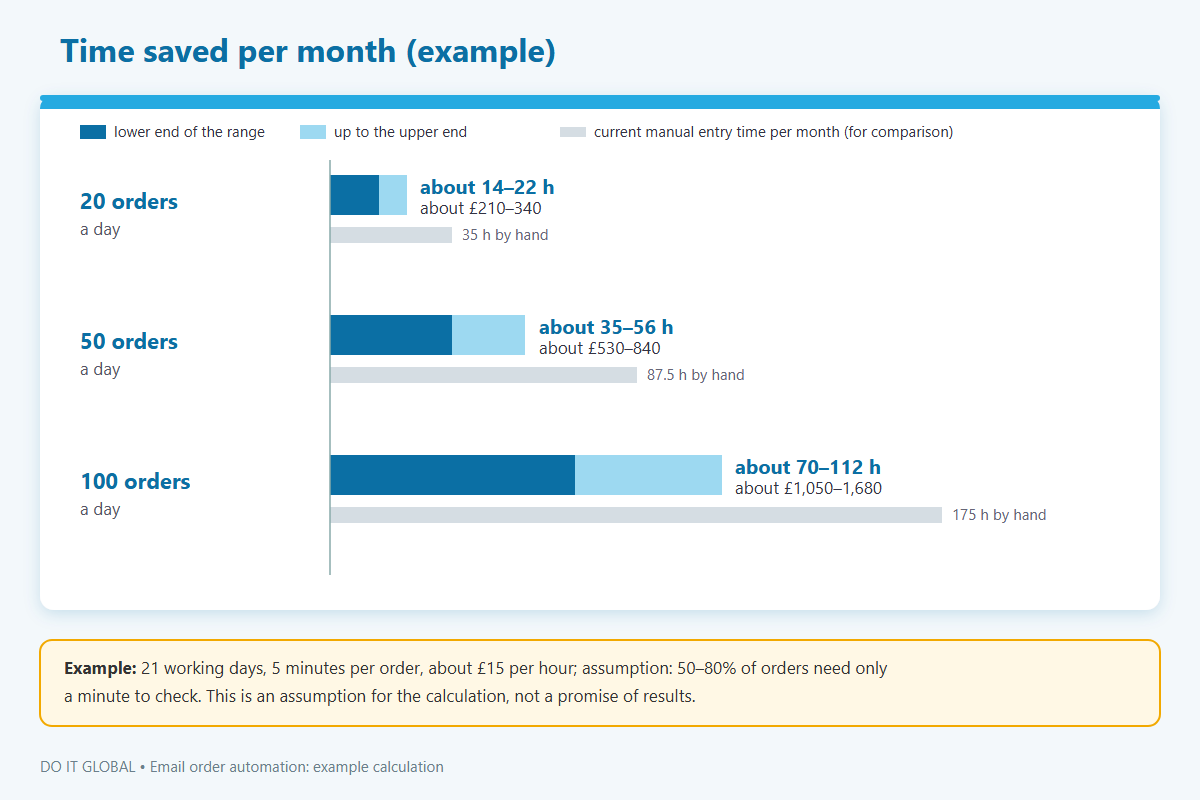
At 20 orders a day, you receive 420 a month. If 210–336 of them take 4 minutes less, you recover about 14–22 hours. Here is how that looks at higher order volumes:
| Orders per day | Time saved per month | Value of that time |
|---|---|---|
| 20 | about 14–22 hours | about £210–340 |
| 50 | about 35–56 hours | about £530–840 |
| 100 | about 70–112 hours | about £1,050–1,680 |
We check the proportion of orders that need no corrections using a sample of your company’s real orders, then keep measuring it after launch rather than assuming a figure in advance. The hours saved do not turn into cash straight away, though. They bring a financial benefit when you avoid hiring another person, reduce overtime or move people to work with customers. Only then can you compare that benefit with the cost of implementation, tools and maintenance.
Order automation is harder to justify when you receive few orders, most already come through a B2B ordering portal or EDI, or every order needs to be negotiated line by line. In those cases, preparing the order alone makes little difference. At low volumes, it is better to combine this process with handling quotations or with matching purchase invoices from KSeF, Poland’s National e-Invoicing System, with orders and goods dispatch notes (WZ): the same ERP connection can then support several improvements, spreading its cost across them.
If you are not sure which case applies to your company, a process analysis using your data will give you the answer.
Frequently asked questions
How much does email order automation cost?
As a guide: £2,900–4,360 excluding VAT for the option that produces a file for you to check and import, or £4,360–7,260 excluding VAT for saving a draft order in the ERP.
Licences (such as an ERP integration module), AI model usage and infrastructure are charged separately. Maintenance is optional. We give you an exact price after reviewing sample orders and checking what your ERP supports.
How long does implementation take?
Implementing order automation usually takes 4–8 weeks. The timescale depends on the system, access to data and the number of order formats. We introduce the solution in stages: first for selected customers or formats, then we expand its scope.
Will it work with my ERP?
That depends on the software, version, licences and the available interface or document import options. We check options such as XML import in Comarch ERP Optima, Sfera in Subiekt nexo PRO or WebAPI in enova365.
For older systems and custom-built applications, we also check how they accept documents. If a direct connection is not possible, a file for import remains an option, provided the system supports it.
Where is the data from order emails processed?
By the chosen AI model provider or, if the data cannot leave your company, using private AI on a server in your company. We agree this with you before connecting your email and ERP. For example, according to the OpenAI API data policy, data sent to the API is not used to train models by default, and processing in Europe (the EEA and Switzerland) requires project configuration and approval from OpenAI.
The solution only has access to the orders mailbox. Emails contain contact details, so when an external company processes them, a data processing agreement is usually needed (the details should be confirmed with a lawyer).
Is n8n, Make or OCR software enough?
For simple, repeatable formats and a small number of orders, a workflow automation tool (n8n, Make) or OCR software is often enough. Matching data to ERP master data, handling unit and packaging conversions, dealing with exceptions and saving data through the software provider’s interface are harder than reading the text. We choose the tool to suit the process, and a custom-built solution is not always needed.
Can AI send order confirmations to customers on its own?
Technically, yes, but we leave the decision to send them to an employee. AI can draft a confirmation or a question about missing information. A confirmation commits you to a price, delivery date and availability, so it needs to be checked. The solution can be given read-only access to email, with no permission to send messages.
What can you do next?
You can find more about the service on our page about email order automation into your ERP. You can also book a free call online (30–45 minutes) so we can look together at where your orders come from, how many you receive and which ERP your company uses.
It is worth bringing a few sample orders in different formats to the call, with any data you do not want to share removed. If your team has recorded orders for a week, those figures will be useful too.