

Your salesperson gets prices from the ERP, prepares a quotation in Excel and checks emails for what was agreed with the customer. Would custom software help them do all this in one place? But the choice is not simply between off-the-shelf software and a system built from scratch: sometimes changing the configuration of your existing software or adding the missing part is enough.
Cheaper off-the-shelf software may still leave you correcting quotations manually. A custom module can be built around your company’s pricing rules, but you pay for maintenance as well as development. Custom software pays off when, in a comparison over several years, the time your team saves is worth more than the difference in spending on software.
How does custom software differ from off-the-shelf software?
Custom software is software or a module built around one company’s processes, data and requirements. It does not have to mean a whole system built from scratch. It can also connect to software you already use. If your team records orders in ERP software but agrees the details with customers in Excel and emails, the solution may cover just that part of the work.
You buy off-the-shelf software for your business through a licence or a subscription. Many companies use the same product, and the vendor, the company that makes and sells the software, develops its features and adapts it to changes in the law. Your company receives updates under the terms of its licence or subscription, while the vendor decides what changes and when. You can configure the software within the limits the vendor has set. If a feature you need is still missing, your team adapts the way it works to the software, or your company looks for an extension.
With custom software, your company decides which features it needs, what data the software collects and what to change first. However, your company has to pay for building and maintaining it. Greater control also brings responsibility: if new legislation requires a change to the software, your company pays for it itself, either under a maintenance agreement with the contractor, the company that builds the software for you, or as a separate job.
What rights does your company have to the software? With off-the-shelf software, you can use it under the terms of the vendor’s licence. With software built to order, your rights depend on the agreement with the contractor and need to be agreed before work starts.
According to Statistics Poland (in Polish), 69.7% of medium-sized companies (50–249 people) and 32.9% of small companies (10–49 people) in Poland used ERP software in 2025. Most medium-sized companies therefore already have such a system. If your company also uses one, but some work still takes place outside it, the question is not whether to choose off-the-shelf software or a system of your own, but what is missing from your ERP and how to fill the gap. The answer may be configuration, an off-the-shelf add-on sold to many companies by the ERP vendor or a partner, or a module built for your company.
Off-the-shelf software, an add-on or a separate system: what are your options?
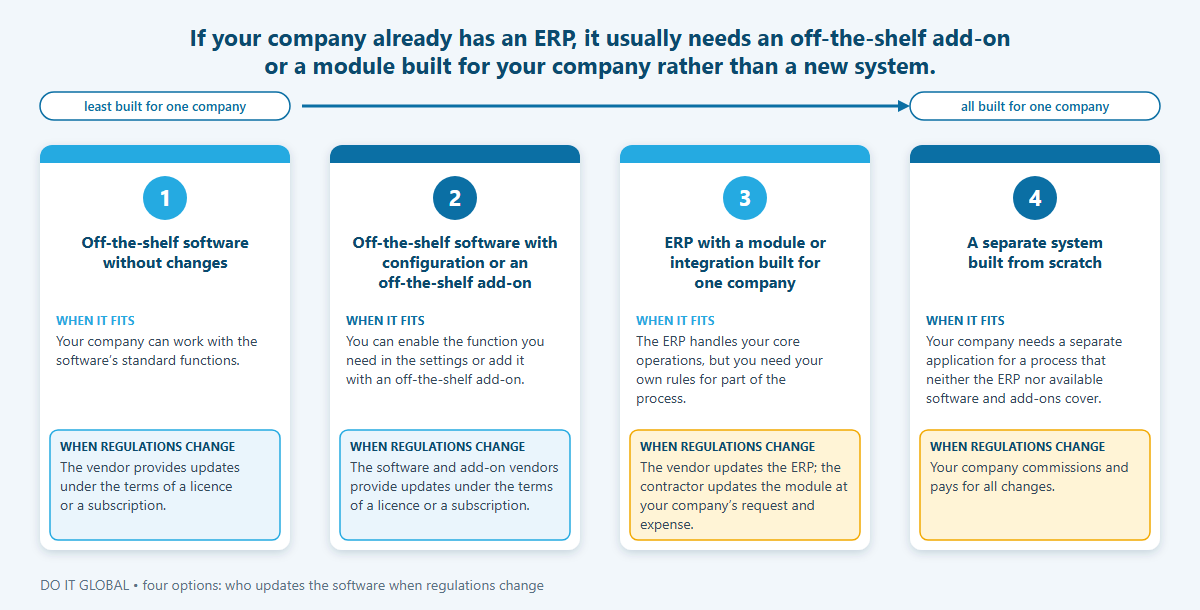
You have four options: off-the-shelf software, off-the-shelf software with configuration or an off-the-shelf add-on, a module built for your company’s ERP, or a separate system built from scratch. If your company already has an ERP, it usually needs an off-the-shelf add-on or a module built for your company rather than a new system.
An off-the-shelf add-on or a module built for your company?
Before commissioning a module, it is worth checking whether you can enable the function you need in the ERP settings or add it with an off-the-shelf add-on. Suppose your salespeople prepare quotations with substitute items and customer-specific prices. What matters with an off-the-shelf add-on is whether the salesperson can apply the right price list and select a permitted substitute item, and whether the add-on works with the ERP version your company uses. The fact that its description lists a “quotations” function does not settle this. Other companies buy the same add-on, and the vendor decides how it develops.
If the add-on is not enough, you can commission a module built for your company, including from a partner of the ERP vendor. You then agree with the contractor where the module will get prices and stock levels, how the salesperson will select a substitute item, and which data from the completed quotation the module will save in the ERP. This kind of custom business software covers only the missing part of the process. Your existing ERP still handles accounting, warehouse operations and invoicing.
To avoid making the salesperson re-enter data, you need integration with the ERP you already use. The contractor checks which mechanisms the ERP vendor provides: an API, an interface through which one program reads and writes data in another, or an SDK, a set of tools for building extensions. This determines whether and how the module can exchange the necessary data with your ERP, so it is established before the module is built.
Comparison of the four options
| Option | When it fits | Who updates the software when regulations change | Main risk | Example from wholesale or manufacturing |
|---|---|---|---|---|
| Off-the-shelf software without changes | Your company can work with the software’s standard functions. | The vendor provides updates under the terms of a licence or a subscription. | Your team adapts its way of working to the software and continues to use Excel for anything the software does not handle. | A wholesaler uses standard invoicing and stock management functions. |
| Off-the-shelf software with configuration or an off-the-shelf add-on | You can enable the function you need in the settings or add it with an off-the-shelf add-on. | The software and add-on vendors provide updates under the terms of a licence or a subscription. | The add-on may not support your company’s rules or its ERP version. | A wholesaler exchanges orders with a large customer’s ordering platform through an available add-on. |
| ERP with a module or integration built for one company | The ERP handles your core operations, but you need your own rules for part of the process. | The vendor updates the ERP; the contractor updates the module at your company’s request and expense. | A new ERP version may require changes to the module. | A salesperson prepares quotations with customer-specific prices and substitute items. |
| A separate system built from scratch | Your company needs a separate application for a process that neither the ERP nor available software and add-ons cover. | Your company commissions and pays for all changes. | Your company funds the application’s development, implementation and maintenance itself; the cost depends on the scope. | A made-to-order machine manufacturer runs each job from configuration with the customer to cost calculation, following its own rules, while available software would require it to change this way of working. |
When does custom software pay off, and when is off-the-shelf software better?
A solution built for your company makes sense when it protects a way of working that customers value or saves your team many hours of work in Excel and email. It pays off when that benefit outweighs the cost of building and maintaining it over several years. Off-the-shelf software is usually better where your company follows the same rules as others and regulations change frequently. There are also situations where no software will help.

When is it worth building a solution for your company?
- A service coordinator schedules service appointments using rules that help customers get support sooner. If off-the-shelf software meant abandoning those rules, your company could lose what customers value about it.
- Employees spend many hours each month in Excel, combining ERP data with details agreed by email because your current software does not support this part of their work.
- An employee copies the same data from one piece of software to another because the two do not exchange data. Connecting them could solve the problem without replacing either.
When is off-the-shelf software better?
Off-the-shelf software is usually a better choice for accounting, HR, payroll and invoicing. Companies handle these tasks under the same, frequently changing regulations. The vendor prepares the updates, and your company receives them under the terms of a licence or a subscription.
KSeF, Poland’s National e-Invoicing System, shows how this plays out in practice. It is the state system in which invoices are issued. From 2026, companies in Poland are required to issue invoices through it, with exceptions described on the scope of mandatory KSeF (in Polish) page. A company that issued invoices using off-the-shelf software received an update for KSeF from the vendor. A company that issued invoices using its own software had to arrange the connection to KSeF itself or switch to another tool. Choosing your own solution therefore also means taking responsibility for keeping it in line with regulations.
When will no software help?
No software will help if the problem lies in how work is organised. If an order is waiting because your team does not know who should approve it, that responsibility needs to be agreed first. Only then can you design how orders are passed on and approved in the software. It is also difficult to build software if no one in your company decides how it should work. Nor will software help if there is so little repetitive work that moving it into software would make little difference.
If you do not know what is holding your team up, you can start with process analysis: at which steps your team leaves the ERP to use Excel or email, why they do so and how long it takes. Measuring this will also show whether the problem lies in the software or in how work is organised. Only then can you choose a solution.
How much does custom software cost, and what does the cost consist of?
There is no single price for custom software built for your company: the cost depends on its functions, connections to other software, the state of your data and how the software needs to perform. You can compare custom software with the subscription for off-the-shelf software only once you add two things to the price of building it. These are maintenance and the value of the work your team will still do manually (time valued at an hourly rate, not cash).
What does the cost of software built to order consist of?
The cost of building the software covers understanding the process and designing the solution, programming, testing, implementation, data migration and team training. The price depends on whether price lists and records need tidying up before work starts, how many other software systems the module needs to connect to, how many users work in it at the same time and how quickly it needs to respond. In a good quotation, the contractor prices each of these stages separately.
After implementation, there are ongoing costs too. The main ones cover ongoing maintenance and development of the software: fixes, updates to keep it compatible with new versions of the ERP and operating system, backups, and a server or cloud hosting. You also pay for changes required by legislation and external services. A company that connects its own invoicing software to KSeF through an API, that is, a data exchange interface, pays for setting up that connection and making subsequent changes itself. The Ministry of Finance materials for KSeF integrators (in Polish) cover documentation, a test environment and programming libraries for the companies that connect software to KSeF, but do not replace this work.
The build is charged at a fixed price for an agreed scope or within an agreed limit of hours. In both cases, the contractor prices any additional work before starting it.
With off-the-shelf software, you pay for a licence or a subscription for each user, as well as implementation and configuration. You also need to include manual work in the part of the process that the software does not cover. It is easy to overlook because it does not appear on the supplier’s invoice.
When building software, we use AI tools to write repetitive code and automated tests. This can reduce the effort needed for some tasks, but the process still has to be understood, the rules the solution should follow agreed with your company, the results checked, the solution connected to other software, the data migrated and the solution implemented, then maintained. That is why AI changes the cost of programming itself more than the cost of the whole solution over several years.
Worked example: a custom module or off-the-shelf software over 3 years
This example uses assumed figures. It is neither a completed project nor a price list; all rates and hours are assumptions. A technical wholesaler employs 40 people and has an off-the-shelf ERP system. Four salespeople prepare quotations in Excel with customer-specific prices and substitute items, alternative products offered in place of the requested ones, spending a total of 60 hours a month on this work. We value an hour of a salesperson’s work at £15: this is based on a salary of about £2,030 gross plus the employer’s costs. We compare 36 months.
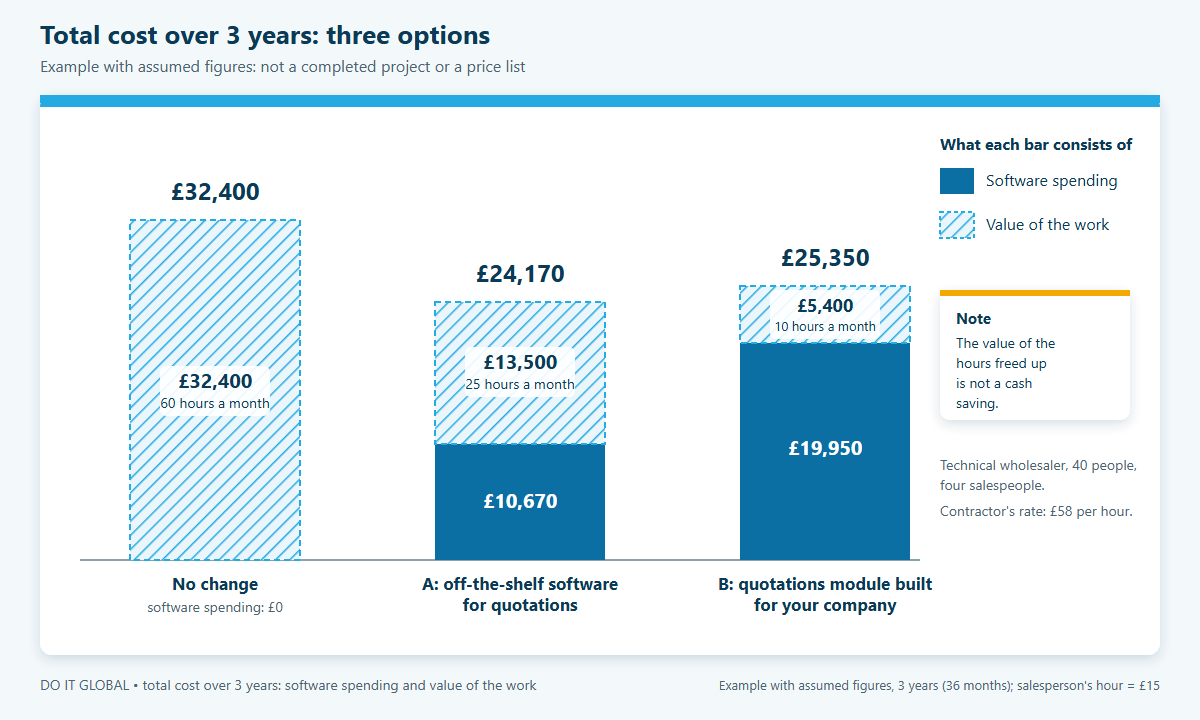
Option A is off-the-shelf software for quotations that does not support substitute items, so the salespeople still prepare some quotations in Excel. Option B is a quotations module connected to the ERP and built using AI tools; only exceptions still need manual work.
The subscription for A includes the server provided by the vendor. Module B runs on the server the company already has for its ERP, and its maintenance covers fixes, updates to keep it compatible with new ERP versions, and backups; new functions are priced separately. In both options, we leave out the team’s time during implementation and any ERP licence needed to connect to other software, as these depend on the particular ERP. Where the difference is a few thousand pounds, these items can change the result.
| Item (36 months) | No change | A: off-the-shelf software for quotations | B: quotations module built for your company |
|---|---|---|---|
| Subscription (4 users × £58 × 36 months) | £0 | £8,350 | £0 |
| Implementation and connection to the ERP | £0 | £2,320 | £0 |
| Building the module, including understanding the process, testing and implementation (200 h × £58 per hour) | £0 | £0 | £11,600 |
| Maintenance (4 h per month × £58 × 36 months) | £0 | £0 | £8,350 |
| Total software spending | £0 | £10,670 | £19,950 |
| Manual work remaining (per month) | 60 h | 25 h | 10 h |
| Value of this work (hours × £15 × 36 months) | £32,400 | £13,500 | £5,400 |
| Total cost over 3 years | £32,400 | £24,170 | £25,350 |
What does this example show?
At the assumed hourly rate, both options have a lower total cost than leaving the work unchanged. Off-the-shelf software works out £1,180 cheaper. The module only comes out ahead if off-the-shelf software leaves more than about 27 hours of manual work a month and the other assumptions stay the same. Maintaining the module for 3 years costs more than two-thirds of the cost of building it.
The value of the hours freed up is not a cash saving. The “Total software spending” row shows spending on the subscription, building the solution, implementation and maintenance. We have valued the salespeople’s time separately, and reducing it does not in itself reduce spending on salaries. The time freed up brings a benefit when the team uses it for other work or the company does not need to hire another person.
How can you do the same calculation for your company?
Four steps are enough:
- Measure the hours spent working outside your current software.
- Ask the off-the-shelf software supplier about the subscription and how much manual work will remain after implementation.
- Add maintenance over the comparison period to the cost of building the module.
- Decide how your team will use the time freed up.
How do you protect your company when you commission custom software?
An agreement protects your company by giving it the right to use the software, change it and hand its development over to another contractor. Payment alone does not give you these rights, because computer software is protected as a work under the Polish Act on Copyright and Related Rights (in Polish). The provision that assigns the copyright in software to the employer applies to software written by employees. When an external company writes the software, your company’s rights depend on the agreement.
Suppose that after three years you want to hand development of your order management module over to another contractor. The new team needs to change how orders are allocated to warehouses. Economic copyright includes, among other things, the right to change the software. If the agreement has not given your company that right, the new contractor may not legally be able to develop the module further. Working software does not, in itself, give you the freedom to choose the team that will develop it.
In the agreement, you decide whether the contractor transfers the copyright in the software to your company or grants it a licence, meaning permission to use the software. The agreement must explicitly list the fields of exploitation, that is, the ways of using the software that the agreement covers. For a transfer of copyright or an exclusive licence, written form is required, otherwise the agreement is invalid. The Act does not require written form for a non-exclusive licence, but it is still worth putting the terms in writing.
Before work begins, you also need to agree what will be needed to take over and maintain the software later:
- Code and documentation: what the contractor will hand over to your company and when it will provide access to the repository, the place where the code and the history of changes are stored.
- Libraries and components: which libraries and components under separate licences the software uses, and which licence terms your company needs to take into account.
- Test environment: who will prepare it and how the team will check changes before implementing them.
- Acceptance criteria: how your team will confirm that the contractor has delivered the agreed scope.
- Maintenance after implementation: who will look after the software and on what terms.
It is worth having a lawyer review the agreement, including the scope of copyright, before you sign it.
Frequently asked questions
Can a module be added to the ERP your company already uses instead of a new system?
Yes, a contractor can add just the missing part to your ERP instead of building a whole system. Before quoting, they should check your ERP version and licence, as well as the available ways to connect to it: an API to read and write data, an SDK to build extensions, or access to the database. Not every ERP provides all these options. A smaller scope of work does not by itself determine whether it is worthwhile, so you need to compare the cost of the module with an off-the-shelf add-on and a new system.
Does maintenance for custom software cost more than a subscription to off-the-shelf software?
It can cost more, depending on how many changes you need. With off-the-shelf software, the vendor includes some changes in the subscription, such as updates to meet legal requirements. With software built for your company, your company pays for those changes. In the example calculation for a technical wholesaler, maintaining the module for 3 years (£8,350) cost more than two-thirds of the price of building it (£11,600). That is why maintenance needs to be included in the comparison from the start, before you decide.
What can you do if the company that built your software no longer exists?
Another contractor can take over development if your company has the rights to make changes and the necessary access. The new team first reviews the code, database, documentation and how the software is deployed. They also need access to the servers where the software runs and is tested. Any missing code or rights need to be clarified before further work is priced, because they determine what the new contractor can do.
Can you add AI to software built to order?
Yes. AI can, for example, read documents, draft an order or quotation, and answer questions about company data. It is added as a function at a specific step in the workflow, with an employee approving the result before the order or quotation moves on. Before commissioning the work, you need to agree which data the AI will use and who will check its output. You can find examples on the page where we describe AI functions in your own application.
Can a no-code tool be enough instead of custom software?
Often, yes. No-code tools, in which you build a workflow without programming, work well for connecting services through ready-made connections and for simple rules. Running your ERP on a company server does not rule out no-code, because some of these tools connect to local databases. The choice depends on whether the ERP allows data to be read and written securely, how many exceptions and calculation rules the process has, how reliably it needs to run, and how much maintenance costs. We explain when rules are enough and when you need AI in a separate article.
What can you do next?
You can book a free call with us online, lasting 30–45 minutes. You can tell us how your team works today and what you want to improve, and together we will work out which of the four options suits your company. The call comes with no obligation.
A short description of the process you want to discuss and the name of the ERP software your company uses will help. If your team has already measured how many hours it spends working outside the software, those figures will help too. You can read about our service on the custom software page.